
You connected your compliance platform, and the dashboard is mostly green. Then the auditor's request list arrives. Much of it is things no integration can pull: a manager's sign-off, a change approval, proof that a flagged issue was fixed.
SOC 2 evidence collection is producing the records that show your controls exist and keep working. Your platform collects the configuration evidence. People still have to produce the decisions, and someone has to chase them.
This article separates the two kinds of evidence. It shows who should own each piece on a small team, how to pull records from Jira and GitHub without screenshots, and a monthly and quarterly rhythm that keeps you ready long before audit week.
What is SOC 2 evidence collection?
SOC 2 evidence collection is gathering the records that prove your controls exist and work: system settings, logs, tickets, approvals, policies and sign-offs. An independent CPA firm, under the AICPA's attestation standards, samples that evidence. In a Type 2 report the sample spans the whole observation period, so evidence must exist throughout, not only on audit day.
SOC 2 is an attestation report on your controls, built on the AICPA's SOC framework. A CPA (certified public accountant) firm examines your controls and writes the report. There are two kinds:
- Type 1 says your controls were suitably designed at one point in time.
- Type 2 says they also operated effectively over a period of months, called the observation period or window.
In a Type 2 audit, the auditor picks a sample from across the window. Say they pick a few production changes from different months. For each one, you need the ticket, the approval and the deploy record, all dated inside the window.
Evidence usually falls into a few types:
| Type | Example |
|---|---|
| Configuration | MFA enforced in your identity provider |
| Logs | Audit logs kept for the period your policy says |
| Tickets | A Jira ticket for each change or fix |
| Approvals and sign-offs | A manager approving an access review |
| Documents | Signed policies, the risk assessment, vendor reviews |
Which SOC 2 evidence does a compliance automation platform collect on its own?
A compliance platform collects the evidence it can read through an API: MFA enforcement in your identity provider, encryption and logging settings in AWS, branch protection in GitHub, and device checks from an MDM agent. That automated evidence is pulled and re-tested automatically on a schedule. Manual evidence is anything a person must produce, approve or explain.
Platforms such as Vanta and Drata, often called GRC tools (governance, risk and compliance), are the system of record for your SOC 2 program. Their integrations read settings from the tools you already run:
| Source | What the platform reads | Control it supports |
|---|---|---|
| Okta or Google Workspace | MFA settings, user list, deactivated accounts | Logical access |
| AWS | Encryption, logging, public buckets, IAM users | System protection and monitoring |
| GitHub | Branch protection, required reviews | Change management |
| MDM agent | Disk encryption, screen lock, OS updates | Endpoint security |
| HR system | Hires and leavers | Onboarding and offboarding |
MDM means mobile device management: the agent that checks company laptops. Each check becomes a test that reruns. When one fails, some platforms can now open the follow-up work. A Vanta product update dated 28 Aug 2026 says its agent can "create the Jira ticket, assign it to the right owner, and link it back", including for tests. If the failing test is a cloud setting, such as a public bucket, see cloud misconfiguration remediation for finding the owner, fixing the code and confirming it.
What SOC 2 evidence can't be automated?
Evidence that records a human decision stays manual: access review sign-offs, change approvals, risk assessment notes, vendor reviews, incident write-ups, training exceptions, and proof that a flagged issue was fixed. Platforms can send reminders and store the files, but someone still has to make the decision, write it down and attach it. This is the work that piles up the week before an audit.
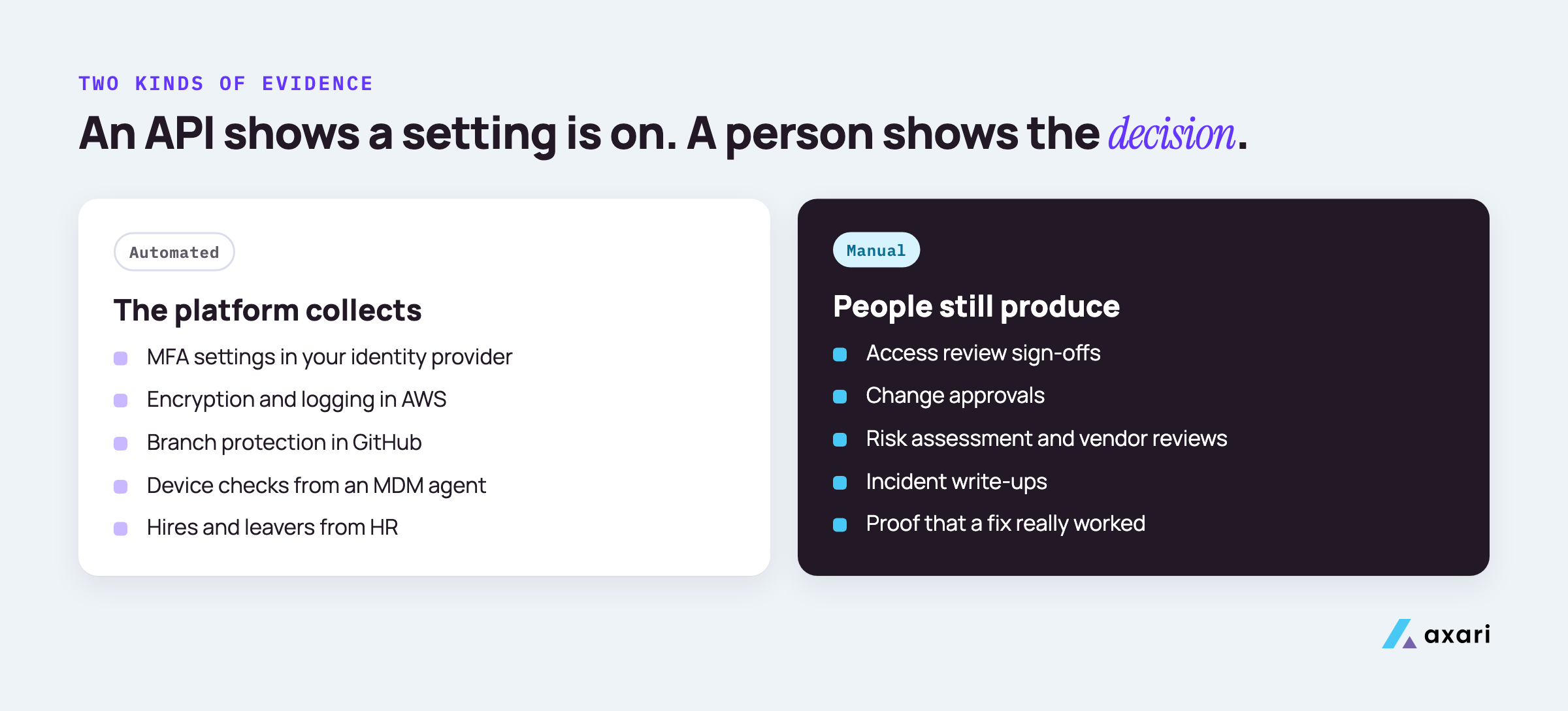
An API can show that a setting is on. It cannot show that a manager looked at a list and decided each person still needs access. The manual pile, and why each item stays manual:
- Access review sign-offs. Only the manager or system owner knows if a person still needs access.
- Change approvals. The approval might be in Jira, but someone has to make sure every change has one.
- Risk assessment. Ranking risks and choosing what to do about them is judgment.
- Vendor reviews. Security reads the vendor's SOC 2 report and chases the gaps; the risk owner decides, and the decision is recorded with a reassessment date. See vendor security assessment.
- Incident write-ups. What happened, who decided what, and what changed after.
- Training exceptions. Why a new hire finished late, and who approved that.
- Proof of fix. A ticket marked "done" only says someone closed it. Proof is the system showing the issue is gone, dated after the fix.
The last item is the one most often missing. A test failed, a ticket was opened and closed, but nobody checked the system again and saved the result.
Who owns each piece of SOC 2 evidence on a security team of one?
Give every control a named owner, outside the security team where you can: engineering leads own change approvals, IT owns onboarding and offboarding, managers own access review decisions, and HR owns training. The security person owns the calendar, the follow-up and the quality check. On a team of one, your job is chasing and checking; the owners produce the artifacts.
The person who makes a decision should be the one who records it.
A simple ownership split looks like this:
| Evidence | Owner | Your job |
|---|---|---|
| Change approvals | Engineering leads | Check every sampled change has one |
| Onboarding and offboarding | IT | Match leavers to disabled accounts |
| Access review decisions | Managers and system owners | Send lists, chase, verify removals |
| Security training | HR or People team | Track completion and exceptions |
| Vendor decisions | The vendor's risk owner | Run the review, record the decision |
| Risk assessment | Leadership, with you facilitating | Run the session and write it up |
| Incident write-ups | Security lead, as incident commander | Make sure one exists for each incident |
Write the owner's name next to each control in your compliance platform, so its reminders go straight to that person. For the wider job beyond SOC 2, see security team of one.
How do you collect SOC 2 evidence from Jira and GitHub?
Collect it from records that already exist instead of taking screenshots. In Jira, keep a saved filter for change and remediation tickets showing the approver, dates and linked fix, and export it each period. In GitHub, branch protection settings and merged pull requests with required reviews show change control. Date every export and tie it to its control.
Screenshots taken the week before fieldwork are weak evidence. They show the state on one day, while the auditor is testing the whole window. Exports of real records are stronger and take less time.
In Jira:
- Build a saved filter for change tickets and another for remediation tickets.
- Add columns for approver, created date, resolved date and the linked pull request or fix.
- Export the filter at the end of each month or quarter, and name the file with the date range.
- Look for tickets with no approver before the auditor does.
In GitHub:
- Turn on branch protection with required pull request reviews for your main branches.
- Export the list of merged pull requests for each period, with the reviewer and merge date.
- Keep a record of the protection settings themselves, and note any change to them.
Then attach each export to the control it supports in Vanta or Drata.
Which SOC 2 evidence does a founder have to collect by hand?
As a founder, you collect by hand the evidence of decisions that only you or your managers can make: the risk assessment, policy approvals, vendor reviews, access review sign-offs, management oversight notes and incident write-ups. Connect your cloud, identity, code and HR tools to a compliance platform first, so your manual time goes only to these decisions and their records.
Connect the integrations and clear failing tests first. What is left is mostly leadership work:
- Risk assessment. Once a year, list the main risks, rate them and record what you will do. Keep the notes and the date.
- Policy approvals. Read and approve each policy, and record the approval date.
- Vendor reviews. For each key vendor, save their security report and record your decision as risk owner, with a reassessment date.
- Access review sign-offs. Sign off on the reviews for systems you own, and on the review of your own admin access by someone else.
- Management oversight. Short notes from the meetings where you looked at security, such as a quarterly review of open issues.
- Incident write-ups. One per incident, even small ones.
How do you keep SOC 2 evidence current between audits?
Run evidence on a calendar instead of an audit date. Monthly, review failing tests, open remediation tickets and new vendors. Quarterly, run access reviews, review open policy exceptions and sample change tickets. Annually, complete the risk assessment, policy review, training, an incident response exercise and any penetration test your controls call for. File each item when it happens, dated.
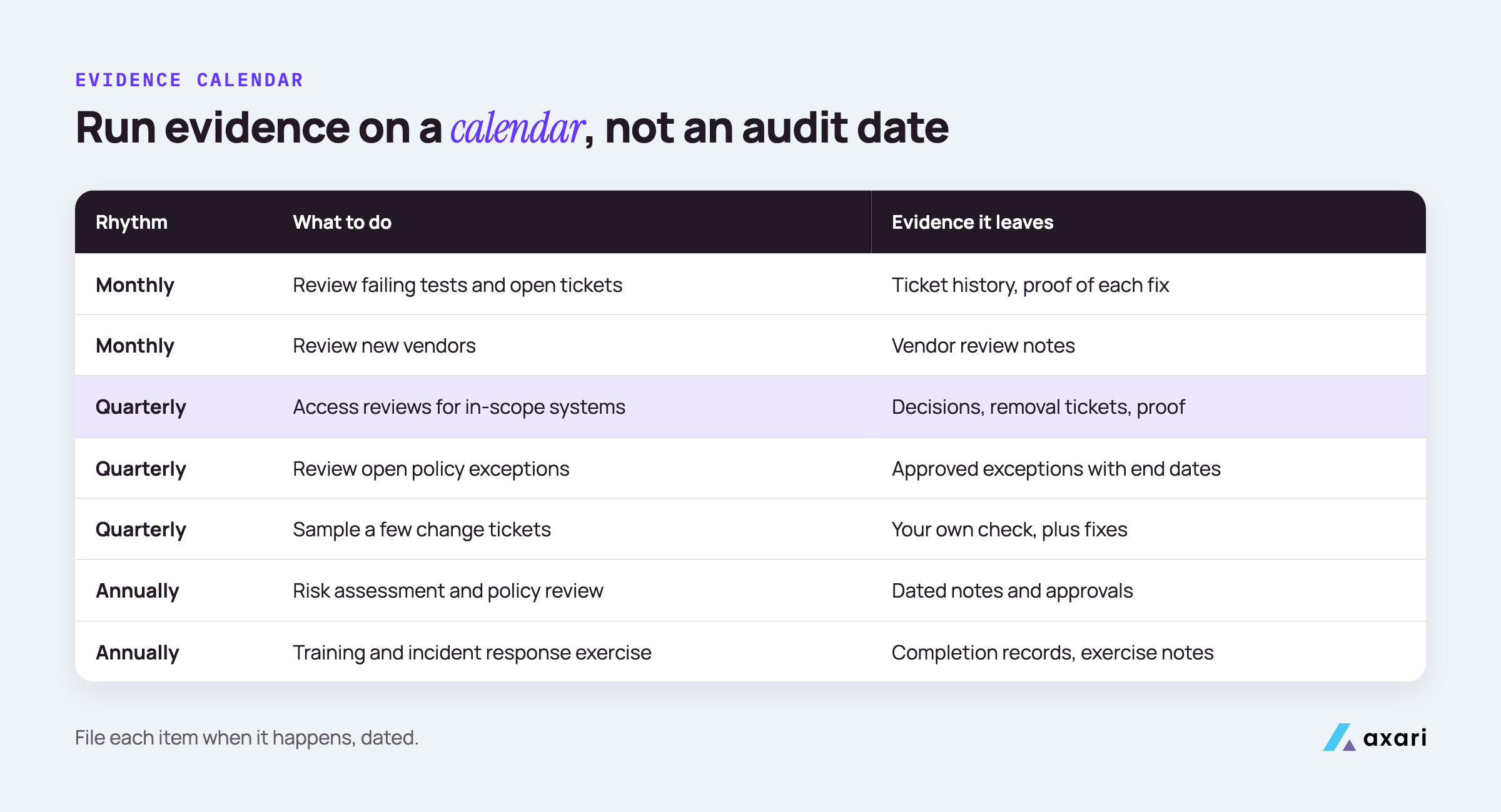
A calendar matches how a Type 2 auditor samples, which is across the whole window.
| Rhythm | What to do | Evidence it leaves |
|---|---|---|
| Monthly | Review failing tests and open remediation tickets | Ticket history, proof of each fix |
| Monthly | Review new vendors | Vendor review notes |
| Quarterly | Access reviews for in-scope systems | Exports, decisions, removal tickets, proof |
| Quarterly | Review all open policy exceptions | Each with approver, reason and expiry date |
| Quarterly | Sample a few change tickets yourself | Your own check, plus fixes for gaps |
| Annually | Risk assessment and policy review | Dated notes and approvals |
| Annually | Security training | Completion records |
| Annually | Incident response exercise, plus a penetration test if your controls call for one | Exercise notes, report, findings tickets |
If your platform supports recurring evidence requests, set them there, so reminders and files live in one place. The quarterly self-sample is the closest thing to a practice audit. The access review is usually the heaviest quarterly item; quarterly access reviews for SOC 2 walks through it. For the yearly exercise, a ransomware response plan gives you a tabletop whose notes, like your restore test results, become evidence.
Compliance automation platform or SOC 2 consultant for evidence collection?
They do different jobs, and many lean teams use both at some point. A platform collects configuration evidence continuously and shows which controls are failing. A consultant helps scope controls, write policies and prepare for the first audit. Neither one makes the people decisions for you: approvals, sign-offs and fixes still need an owner inside the company, whichever you choose.
| Need | Better fit |
|---|---|
| Continuous checks on cloud, identity and code settings | Compliance platform |
| A place to store evidence and give the auditor access | Compliance platform |
| Deciding which systems and controls are in scope | Consultant |
| Writing policies that match how you actually work | Consultant |
| A readiness review before the first audit | Consultant |
| Approvals, sign-offs and fixes | Your own people |
A consultant's work is mostly front-loaded: scope, policies and readiness. The platform's work, and your own people's, runs every month after that. If you already use Vanta, Is Vanta enough for SOC 2? covers when a consultant still earns their fee.
Our GRC tool says most controls are automated. Why am I still chasing screenshots and sign-offs?
Because "automated" usually means the platform monitors the control; much of the proof still comes from people. The tickets, approvals and owner sign-offs live in Jira, Slack and email, and someone has to ask for them. An AI Twin such as Axari can chase those owners in Slack or Teams and prepare the evidence for your approval and upload.
When a test fails, Vanta Agent can already create the Jira ticket, assign it to the right owner and link it back, inside your system of record.
The work that remains sits after the ticket:
- Reminding the owner until the fix ships.
- Checking the system again to confirm the issue is gone.
- Collecting the proof, dated, and matching it to the control.
- Getting the manager sign-offs that never had a ticket at all.
None of this is configuration, so no integration finishes it. It moves faster when each request reaches the owner where they already work, with the context and a due date attached. It is done when someone confirms the result in the source system after the ticket closes, and files the dated proof against the control in Vanta or Drata. Remind the owner directly first; bring in their manager only for repeated misses or SLA breaches.
What should a SOC 2 evidence checklist include?
A useful SOC 2 evidence checklist lists every evidence item with the control it supports, its owner, how often it is due, and whether it is collected automatically or by hand. Add where the evidence lives and the date it was last collected. That last column tells you, weeks before fieldwork, which items would fail an auditor's sample.
Fieldwork is the part of the audit where the auditor asks for and tests your evidence. A checklist built this way shows you the gaps before that starts.
A few example rows show the shape. Adjust them to your program, and add a "last collected" date to each:
| Evidence item | Control area | Owner | Frequency | Automated or manual | Where it lives |
|---|---|---|---|---|---|
| MFA enforced for all users | Logical access | IT | Continuous | Automated | Compliance platform |
| Access review sign-offs | Logical access | Managers | Quarterly | Manual | Compliance platform |
| Change approvals | Change management | Engineering leads | Per change | Manual, from a Jira export | Jira |
| Vendor review and decision | Vendor management | Risk owner | Per new vendor | Manual | Shared folder |
| Risk assessment | Risk assessment | Leadership | Annually | Manual | Shared folder |
Sort by "last collected" and compare it with the frequency. Anything older than its frequency is a gap today. A quarterly access review last done five months ago, for example, has already missed a cycle.
Frequently asked questions
Is SOC 2 manual evidence still a lot of work with a compliance automation platform?
Usually some of it is, yes. A platform removes most configuration screenshots, but approvals, reviews, risk decisions and proof of fixes still need people. The work stays small when every manual item has an owner and a due date, and grows when it is left until the weeks before the audit.
How do I keep up with SOC 2 evidence requests as the only security person at a 200-person company?
Stop producing the evidence yourself and start scheduling it. Assign each recurring item to an owner, batch requests by month, keep short templates for approvals, and check completeness weekly. If customers also send security questionnaires, answer them from the same evidence library so you collect each record once.
What should a small team look for in SOC 2 evidence collection tools?
Look for integrations with the systems you already run, a clear split between automated tests and manual evidence requests, owner assignment with reminders, evidence history for each period, and an auditor view. Ask each vendor how manual evidence gets requested and approved, because that is where much of a small team's time goes.
Your next step: list the manual pile
Open your compliance platform and filter for every control that needs manual evidence. Put an owner and a due date next to each one, and note the date of the last record. Sorted by that date, the list shows which items are already overdue.
Then decide who does the chasing, so you stay audit-ready. Axari is the AI workforce for cybersecurity teams, and a Twin can own that follow-up. It asks owners in Slack or Teams, re-checks the system after each fix and prepares the evidence for your approval and upload to Vanta or Drata. You keep the judgment, and nothing is sent or changed without your approval. Request a demo to see how a Twin handles audit follow-up.