
Your posture tool connected to your AWS accounts on Monday. By Tuesday it had a long list: open buckets, wide security groups, roles with admin rights nobody remembers granting. You fixed two by hand in the console. A week later, both were back.
Cloud misconfiguration remediation is correcting risky cloud settings and keeping them corrected. That means finding who owns each resource, changing the setting in the code that built it, and confirming the change in the cloud itself.
This article covers whose job configuration is, what posture tools do, how to prioritize, who fixes what, fixing in Terraform, drift and proof.
What is cloud misconfiguration remediation?
Cloud misconfiguration remediation is the work of correcting risky cloud settings, such as a public storage bucket or an overly broad IAM role, and keeping them corrected. Posture tools flag these on every scan, so detection is the easy part. Most of the effort goes into finding the owner, fixing the setting in code and confirming the change in the cloud itself.
A misconfiguration differs from a software vulnerability. There is no missing patch and usually no CVE (the public ID for a known software flaw). Someone chose a setting, or accepted a default, and it leaves a door open. IAM, short for identity and access management, decides who can do what in the cloud, and many of these doors sit in IAM.
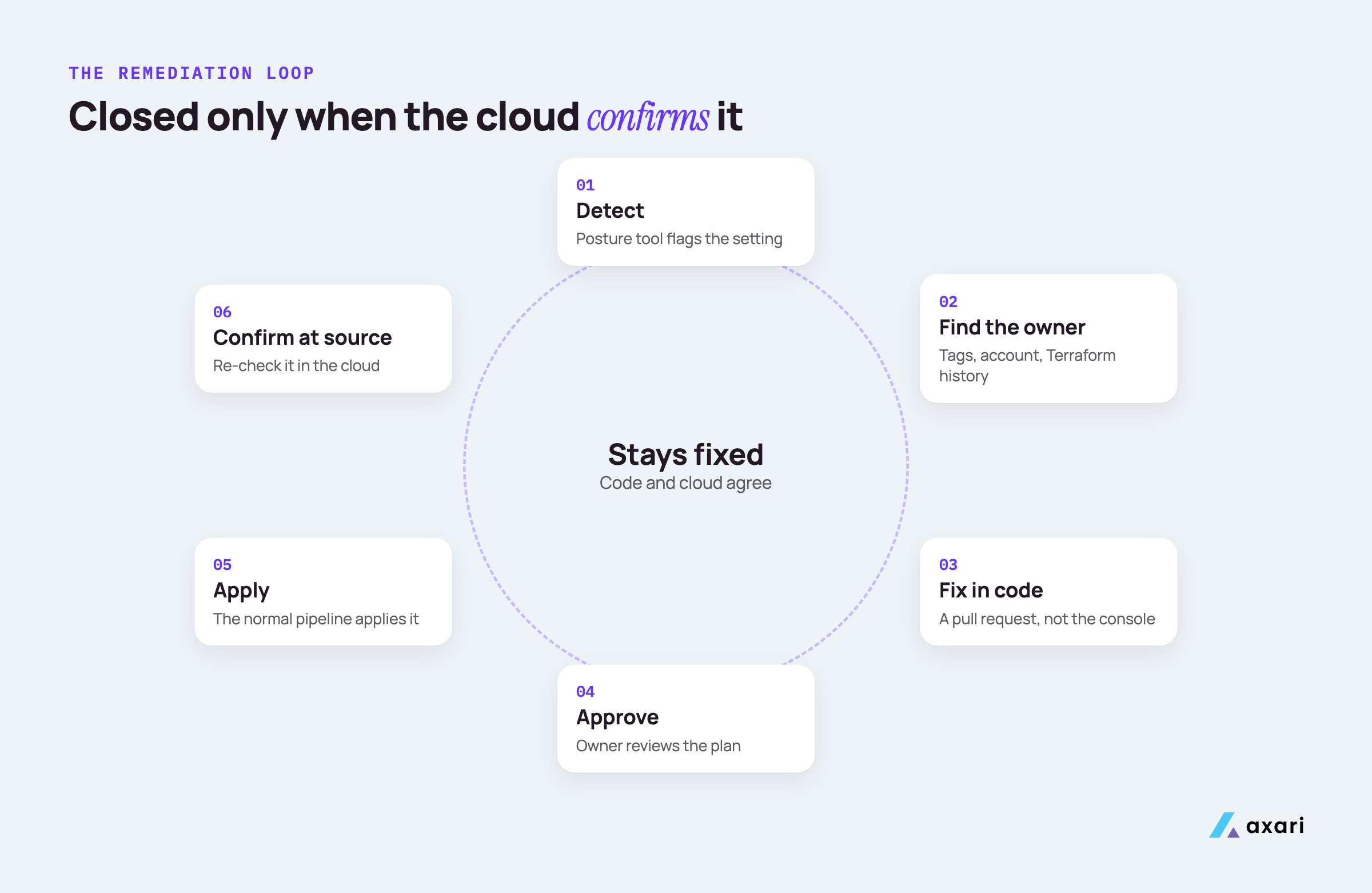
A person can also choose it again, so "keeping them corrected" is half the job. The loop:
- Detect. A posture tool flags the setting.
- Prioritize. Weigh exposure and data sensitivity.
- Find the owner. Work out which team and service it belongs to.
- Fix it in code. Change it where the resource is defined, usually in infrastructure as code (files, such as Terraform, that build your cloud resources).
- Confirm it in the cloud. Check the live setting.
- Record it. Keep finding, fix and check together for audits.
Most teams do step 1 well and skip steps 3 to 5.
Who is responsible for cloud misconfigurations: you or the cloud provider?
You are. AWS describes its share as security of the cloud, meaning the infrastructure, and yours as security in the cloud, including security groups and IAM permissions. Microsoft's responsibility matrix lists configurations and settings as the customer's in every service model, and Google Cloud says customers always remain responsible for their access policies and data.
This split is called the shared responsibility model. The provider looks after buildings, hardware and the physical network. You look after what you build on top and how you set it up.
| Provider | What the provider covers | What stays with you |
|---|---|---|
| AWS | The infrastructure that runs AWS services | Security group rules, IAM permissions, your data and encryption choices |
| Microsoft Azure | Physical hosts, network and datacenters | Customer data, configurations and settings, identities and users |
| Google Cloud | A trusted platform for your workloads | Access policies and data |
Read each in the provider's words: AWS, Microsoft and Google Cloud.
So if a bucket is open to the internet, the provider did not open it. Managed services (PaaS) and rented software (SaaS) shift some work to the provider, but settings and access stay with you in every model.
What is cloud security posture management (CSPM)?
CSPM is a category of tools that inventory your cloud resources through the provider's APIs and compare their settings against policies and benchmarks such as CIS. AWS defines it as a tool for visualizing, prioritizing and remediating security findings. AWS Security Hub CSPM and Wiz work this way. CSPM finds the problem, and people still own the fix.
AWS's explainer on CSPM describes four phases that run continuously: finding cloud assets, checking them against standards, ranking findings, and offering remediation guidance or automation. A posture tool sees every connected account and checks every resource on a schedule.
A finding often leaves out the context around it:
- Who owns it. It names a resource, not always the team that runs it.
- Where it was built. If Terraform created it, the fix belongs in a repository.
- Whether a change is safe. Closing a port can break a service that depends on it.
- Whether it stays fixed. A fix that skips the code can be undone by the next deploy.
If you are working toward SOC 2, your compliance platform also runs its own cloud tests, and Vanta and Drata are the system of record for that audit. For where your team's own work starts, see Is Vanta enough for SOC 2?.
What are the most common cloud misconfigurations?
The usual ones are storage buckets open to the public, IAM users and roles with far more permission than they need, security groups or firewall rules open to the whole internet, unencrypted storage, disabled audit logging and access keys on the root account. Most of them map to checks in the CIS Benchmarks for AWS, Azure and Google Cloud.
This is how they show up in AWS Security Hub CSPM, using controls from its CIS AWS Foundations Benchmark standard:
| Misconfiguration | Example Security Hub CSPM control |
|---|---|
| Public storage bucket | S3.8: buckets should block public access |
| Old, unused credentials | IAM.22: credentials unused for 45 days should be removed |
| Admin ports open to the internet | EC2.53: no ingress from 0.0.0.0/0 to remote administration ports |
| Unencrypted storage | EC2.7: EBS default encryption should be enabled |
| Audit logging off | CloudTrail.1: CloudTrail should be enabled |
| Root account access keys | IAM.4: root user access key should not exist |
For buckets, AWS documents four S3 Block Public Access settings at the account and bucket level. Turning them on for the account is a strong default when no bucket needs to be public.
Permissions are the hardest to fix, because "too much access" is the owner's judgment. If you run user access reviews, add cloud roles to them; our guide to quarterly access reviews for SOC 2 shows how to record those decisions.
How do you use the CIS Benchmarks to remediate cloud misconfigurations?
Treat the CIS Benchmarks as your baseline. They are consensus-based secure configuration recommendations from the Center for Internet Security, free as PDFs for non-commercial use, and each recommendation comes with remediation steps. Start with Level 1, the practical baseline, before Level 2's stricter settings. Most posture tools, including AWS Security Hub CSPM, check accounts against them.
CIS explains in Getting to know the CIS Benchmarks that each recommendation has a description, a rationale, an impact section, an audit section showing how to prove it is in place, and a remediation section with the steps. Read the impact section first.
The CIS Benchmarks FAQ describes Level 1 as a baseline you can apply quickly with little performance impact, and Level 2 as defense in depth for environments that put security first.
One way to work through the AWS benchmark:
- Turn on the standard. Security Hub CSPM supports CIS AWS Foundations Benchmark versions 5.0.0, 3.0.0, 1.4.0 and 1.2.0; AWS recommends 5.0.0.
- Fix Level 1 failures first, grouped by control, so one change clears many findings.
- Check the manual items. Security Hub CSPM does not automate every CIS requirement.
- Write the fix into code, so the baseline holds.
- Record exceptions with a reason, compensating controls and an expiry date, approved by the named risk owner.
How do you prioritize cloud misconfiguration findings?
Use the same four tiers as for vulnerabilities, with publicly exposed standing in for internet-facing. P1: signs of exploitation on a publicly exposed resource. P2: publicly exposed resources that hold sensitive data or grant privileged access. P3: high severity, no exploitation signal. P4: everything else, reviewed in the backlog. Each tier has an SLA, and the clock starts at detection.
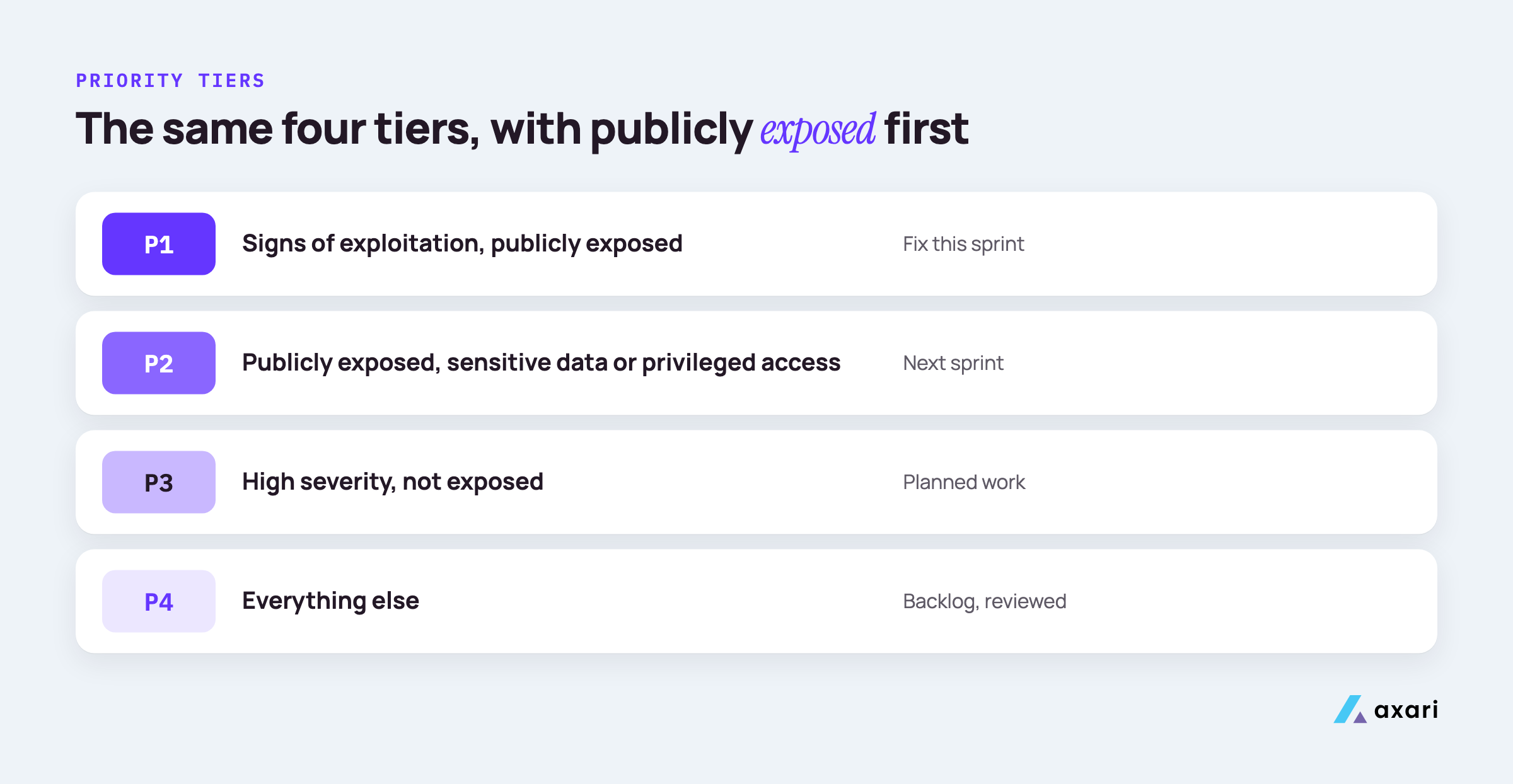
An SLA is the deadline your policy sets per tier. The tiers match our guide to prioritizing with CVSS, EPSS and KEV, so engineers see one rule for every finding.
| Tier | Cloud example | Deadline |
|---|---|---|
| P1 | An open bucket whose logs show unknown readers | This sprint |
| P2 | A public bucket holding customer data | Next sprint |
| P3 | Unencrypted storage on an internal system | Planned work |
| P4 | A logging gap in a sandbox account | Backlog, reviewed |
Harder still: say Wiz flags a few hundred misconfigurations across your AWS accounts and you are the only security person. Do not open a few hundred tickets:
- Group by rule and account. Many findings often trace back to one shared Terraform module. Fix the module once.
- Start with changes that do not alter behavior, such as turning on logging.
- Ask before you close a door. For a security group or permission, ask the owner what uses it first.
- Park the rest as P4, with a review date.
The SLA counts as met only after the fix is confirmed in the cloud.
Who is responsible for fixing cloud misconfigurations, security or DevOps?
The team that owns the resource fixes it; security owns the process. Security sets the baseline, prioritizes findings, sets SLAs and verifies closure. Engineering or DevOps changes the code and deploys it. The hard part is knowing who owns a resource, so require owner and team tags, use one account or project per team, and check the Terraform history.
The same split works for vulnerabilities, as our guide to vulnerability management for a small security team explains: clear owners, one written rule and good communication with the people who run each system.
When a resource has no obvious owner, work through these in order:
- Tags. Look for
owner,teamorservicetags. The Terraform AWS provider'sdefault_tagsblock adds them to every resource a configuration creates. - The account or project. If each team has its own AWS account or Google Cloud project, the account names the team.
- The code. Search your Terraform repositories for the resource name. The commit history shows who added it.
- The audit log. AWS CloudTrail records API activity, including who created a resource.
- Ask in the team channel if all else fails.
Then add the missing tags so the next finding routes itself. A resource nobody owns is a finding of its own; engineering leadership decides whether to adopt or remove it.
How do you fix cloud misconfigurations in Terraform?
Fix the code, not the console. Find the resource in your Terraform, change the setting in a pull request, review the plan and let the normal pipeline apply it. Add an infrastructure as code scanner to CI so the setting cannot return. An AI Twin can follow up with the owner until the change is merged and verified, and nothing changes without approval.
Terraform is HashiCorp's tool for describing cloud resources in code; its plan step shows what will change first. A fix for a public bucket, using the AWS provider's aws_s3_bucket_public_access_block resource:
resource "aws_s3_bucket_public_access_block" "reports" {
  bucket                  = aws_s3_bucket.reports.id
  block_public_acls       = true
  block_public_policy     = true
  ignore_public_acls      = true
  restrict_public_buckets = true
}
The steps, in order:
- Confirm Terraform manages the resource. If not, decide whether to import it or fix it by hand, and write down why.
- Open a pull request that links to the finding.
- Read the plan. Watch for any resource it wants to replace rather than update in place. Replacing a database, for example, can mean losing its data.
- Get the owner's review, then let the pipeline apply it.
- Add a guardrail. An infrastructure as code scanner, such as Snyk IaC or the open source Checkov, runs in CI (the automated checks on every pull request) and fails the build if the setting returns.
Why do cloud misconfigurations keep coming back after you fix them?
Usually the fix was made in the console while the code still holds the old setting, so the next deploy restores it. The reverse also happens: someone changes a setting by hand and the cloud drifts from the code. Terraform reports changes made outside it on each plan, so review that output and keep the code authoritative.
That gap between code and reality is called drift. HashiCorp's tutorial on managing resource drift shows how it appears: the plan opens with a note that objects have changed outside of Terraform, then lists each changed attribute.
| What happened | What you see | What to do |
|---|---|---|
| Fixed in the console, code unchanged | The next apply undoes the fix | Put the fix in code, then apply |
| Changed by hand, code correct | The plan reports a change outside Terraform | Ask why, then apply the code |
| Changed by hand on purpose | Same note in the plan | Update the code through a pull request |
HashiCorp also documents a refresh-only plan, which updates Terraform's record of the cloud without changing real resources.
To keep drift low, run a scheduled plan that alerts on drift, and limit console write access in production to break-glass roles.
How do you verify a cloud misconfiguration is fixed?
Confirm the setting in the cloud itself, not the merged pull request. Re-run the posture tool's check or query the provider's API for that resource, and confirm the fix is in the Terraform code too. Only then close the finding and count the SLA as met. An AI Twin can follow up until the fix is verified and prepare the closure record for your approval.
A merged pull request shows the change was approved. It does not show the change ran in every account, so check three things:
- The live setting. Ask the provider directly. For a bucket,
aws s3api get-public-access-block --bucket <name>returns the current settings. - The posture tool's view. Re-run the check. AWS documents that Security Hub CSPM checks are either change-triggered or periodic, and periodic ones run within 12 or 24 hours of the last run. Look at when the check last ran before trusting a pass.
- The code. Make sure the setting lives in Terraform and the scanner in CI enforces it.
Record the finding, fix, check and date on the ticket. If a check fails, reopen it with the output attached; a setting that drifts back after a clean check counts toward your reopen rate. The same rule applies to vulnerabilities, where the rescan is the proof; see how to verify vulnerability remediation after the ticket closes.
Frequently asked questions
Should you turn on automatic remediation in your CSPM?
Use it narrowly, and only for rules a person approved in advance. It can close simple findings quickly, such as blocking public access on a bucket that should never be public. A change made directly in the cloud bypasses your code, so the next deploy may undo it, and a wrong change can break production. Otherwise, use a reviewed pull request.
What is the difference between CSPM and CNAPP?
CSPM checks cloud configurations against policies and benchmarks. A cloud-native application protection platform, or CNAPP, is a broader category that bundles CSPM with other protections, such as workload scanning, identity analysis and infrastructure as code checks. For remediation the workflow is the same either way: find the owner, fix it in code, verify it in the cloud.
What SOC 2 evidence do you need for cloud misconfigurations?
Keep evidence that matches your policy, because auditors test what it says: posture reports showing which accounts you monitor, tickets with owners and dates, the check confirming each fix and approved exceptions with expiry dates. Vanta and Drata stay the system of record and run their own cloud tests, so a test that turns green again is good supporting proof.
Fix it once, in the code, and prove it
This week, pick your three most exposed findings. Find each owner, put the fix in Terraform, and confirm the live setting before you close the ticket.
That is how you keep exposures within policy. The rest is follow-up: chasing owners, re-checking the cloud and keeping evidence together. Security tools find the work. Axari makes sure it gets done. An AI Twin carries that follow-up in Slack or Microsoft Teams while you keep the judgment, and nothing is sent or changed without your approval. To see how it would work on your cloud findings, request a demo.