
If you are the only security person at your company, or one of a handful, you know the feeling. The scanners run every day. Wiz, Snyk or Qualys hand you a long list. The list never gets shorter, because every fix needs an engineer's time, and that engineer has a roadmap of their own.
For a small security team, vulnerability management means getting the right few problems fixed and proving they stay fixed. Most of the work is process: clear owners and steady communication between security and the people who run each system.
Below are the six steps, then how to triage a huge first scan, work with engineers in Jira and Slack, verify fixes for auditors and decide what to report and automate.
What does vulnerability management look like for a small security team?
For a team of 1 to 15, vulnerability management is mostly about getting the right findings fixed and confirmed. Your scanners already produce plenty of findings. The scarce resource is follow-up time with engineers, so the program is built around clear ownership, a short priority rule and verified closure.
Start with the scale. A CVE (Common Vulnerabilities and Exposures entry) is the public ID for one known security flaw, a bit like the recall number on one faulty car part. In 2025, 48,185 CVEs were published, about 132 a day, according to Jerry Gamblin's 2025 CVE Data Review. Nobody reads all of them.
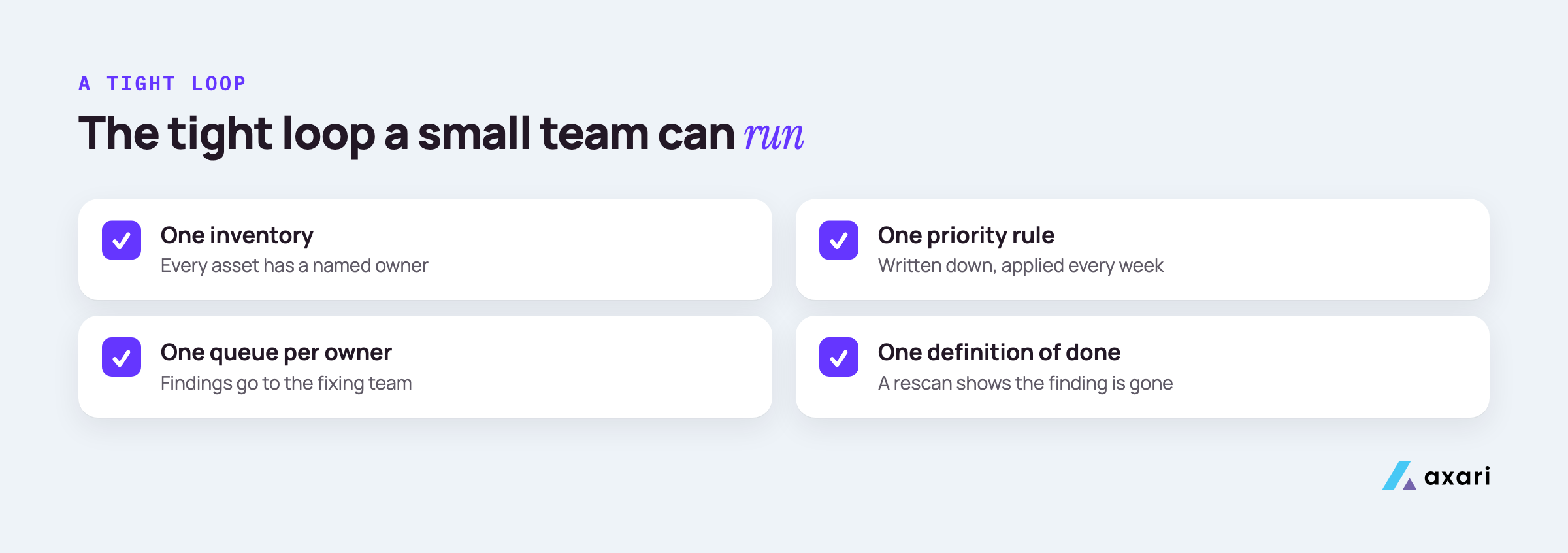
What a small team can do is run a tight loop with four parts:
- One inventory. Every repo, cloud account and service has a named owner.
- One priority rule. Written down, short enough to remember, applied the same way every week.
- One queue per owner. Findings go to the team that can fix them, not to a shared security inbox.
- One definition of done. A rescan shows the finding is gone.
None of this needs a new scanner. A cloud tool like Wiz, a code tool like Snyk and perhaps Qualys or Rapid7 for hosts will find far more than anyone can fix. Many cloud findings are misconfigurations rather than missing patches, and cloud misconfiguration remediation runs them through the same tiers and checks. The gap sits between the report and the fix: who owns it, who was told and who checked. Closing it means better communication between security and asset owners, so spend your time there.
What are the vulnerability management process steps from discovery to remediation?
The process has six steps: discover assets and findings, prioritize, assign an owner, fix, verify the fix with a rescan and report. Many guides stop at remediation, but only verification shows that a closed ticket reduced risk. For a small team, assignment and verification take most of the time, so plan for them explicitly.
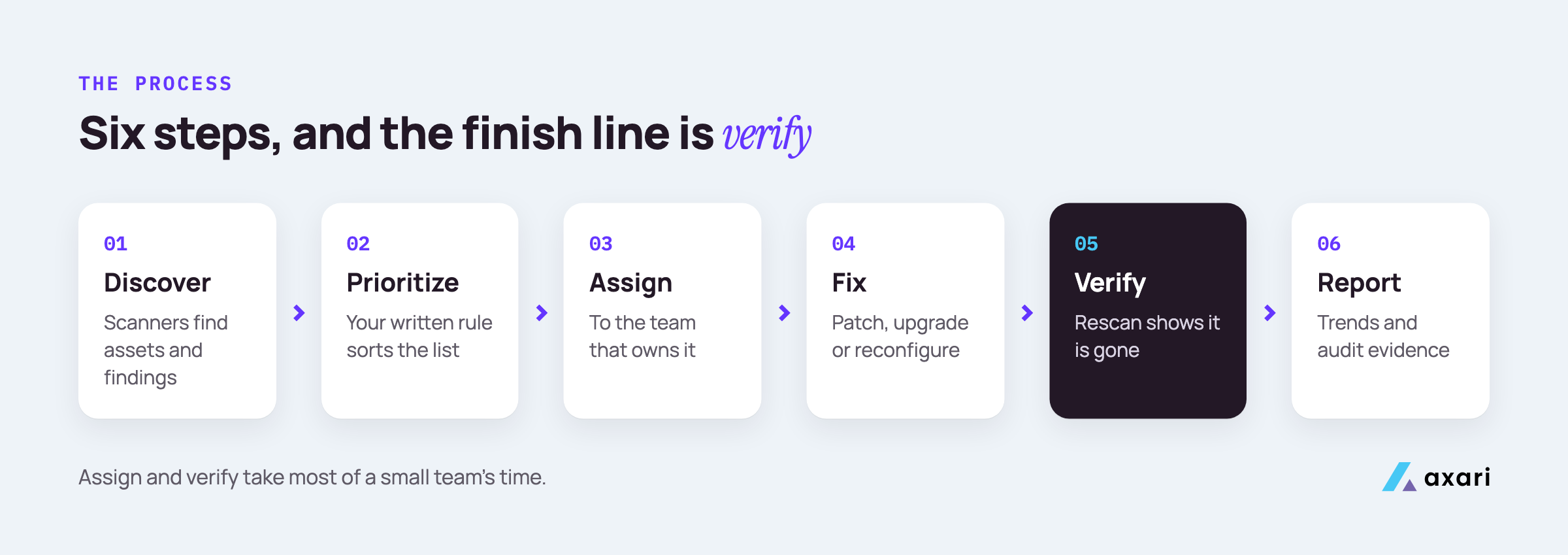
| Step | What happens | Who usually does it | Where it lives |
|---|---|---|---|
| 1. Discover | Scanners find assets and findings in code, cloud and hosts | Tools, set up by security | Wiz, Snyk, Qualys, AWS |
| 2. Prioritize | Your written rule sorts the list | Security | Your policy, scanner filters |
| 3. Assign | Each finding goes to the team that owns the asset | Security, with engineering leads | Jira |
| 4. Fix | Patch, upgrade or reconfigure | The owning engineer | GitHub, the deploy pipeline |
| 5. Verify | Rescan and confirm the finding is gone | Security or tooling | The scanner |
| 6. Report | Trends for leadership, evidence for audits | Security | A monthly summary |
Steps 3 and 5 are the ones people underestimate. Assigning sounds like one click. It usually means finding the right person, explaining the issue in their terms and agreeing on a date. Verifying sounds automatic, but a ticket marked Done in Jira only means someone believes it is fixed. Code can be fixed in a branch and never deployed. A container can be rebuilt from an old base image. Only the rescan tells you the risk is gone.
How do you build a vulnerability management program from scratch?
Start with an asset inventory and a named owner for every repo, cloud account and service. Then write a one-page policy covering scan coverage, a priority rule, remediation SLAs, an exception process and how fixes are verified. Add tooling last. A short program that matches what you do beats a large tool stack nobody follows.
When nothing is written down yet, work in this order.
- List what you run. Pull accounts from AWS Organizations, repos from GitHub and apps from Okta. A spreadsheet is fine at first.
- Name an owner for each item. A person or a team, not "engineering". Anything without an owner goes to an engineering lead to claim or shut down.
- Write the one-page policy. Cover what gets scanned and how often, your priority rule, an SLA for each tier, how exceptions are approved and how a fix is verified. An SLA (service level agreement) here means the deadline you promise for each priority tier. The clock starts at detection, and an SLA counts as met only after verification.
- Agree it with engineering leads. A policy they never saw is a policy they will not follow.
- Then connect the tools. Point scanners at the inventory and send their output to each owner's queue.
Keep the policy honest. If it says you scan weekly, scan weekly. Auditors test what your policy says, so a smaller promise you keep is safer than a bigger one you miss.
I just ran our first scan and got 4,000 findings. Where do I start?
Start by filtering the list before anyone fixes anything. Remove duplicates and findings on assets you no longer run. Then pull out anything known to be exploited, from CISA's KEV catalog or elsewhere, on assets an attacker can reach. That is your first sprint. High-EPSS findings on internet-facing or sensitive systems come next. Group the rest by owner and by fix.
A first pass looks like this, though your counts will differ.
- Deduplicate. If two tools report the same CVE on the same asset, keep one record. Wiz and Snyk often overlap on container images.
- Remove the dead. Drop findings on servers, images or repos you no longer run. Check with the owner first.
- Pull out what is being exploited. CISA's Known Exploited Vulnerabilities catalog, or KEV, lists flaws that attackers are known to have used in the wild. Any match on a reachable system goes to the top, as does any flaw you know is under attack.
- Pull out high-EPSS findings on exposed systems. EPSS is FIRST's daily score for how likely a CVE is to be exploited in the next 30 days. A high score on an internet-facing system, or one that holds customer data, is next in line.
- Group by fix. One base image or library upgrade can close a long list of findings.
Step 3 gives you P1, fixed this sprint, and step 4 gives you P2, the next sprint. The rest becomes P3 planned work or the reviewed P4 backlog, grouped by owner. The first week's goal is a short list the right owners have agreed to fix. For the tiers and how to set an EPSS cut-off, see CVSS vs EPSS vs KEV: how to prioritize what your team can fix.
How do you handle a vulnerability backlog as the only security person?
Treat the backlog as a question of ownership more than volume. Agree with engineering leads that each team owns the findings on its own services, set SLAs by priority tier and review the top tier weekly. Route Wiz and Snyk findings to the owning team's queue. An AI Twin can chase follow-ups in Slack, with your approval before each message.
A backlog grows when findings sit somewhere nobody owns. A shared security queue, a dashboard only you open, or a monthly PDF all lead to the same result: work with no owner.
Four changes make the difference:
- A written agreement. Each engineering lead agrees that their team owns findings on their services, and agrees the SLA for each tier. Get it in writing, even if that is a Slack thread.
- Routing at the source. Set up Wiz projects and Snyk organizations so findings map to the owning team. Then use each tool's Jira integration to send them to that team's project, not to yours.
- A weekly review of the top tier only. A short call with each lead: what is overdue, what is blocked, what has no owner. Let the SLA handle the lower tiers.
- Exceptions on purpose. If a team cannot fix something in time, they ask for an exception with a reason, compensating controls and an expiry date. Security runs the process; the named risk owner or an executive sponsor decides at the monthly leadership review, and open exceptions are reviewed quarterly. A missed date then becomes a recorded decision with a name on it.
Your job becomes running the system and making the hard calls, instead of being the one person who remembers every open item.
How do you get engineers to fix vulnerabilities?
Put fixes where engineers already work: one Jira ticket per fix, not per finding, in the owning team's backlog, with the priority reason and due date on the ticket. Keep the number small, explain why each one matters and agree SLAs with engineering leads in advance. Working with their sprint planning gets more fixes shipped than escalation does.
A good fix ticket answers the engineer's first questions before they ask. A simple layout:
| Field | Example |
|---|---|
| Title | Upgrade the logging library in payments-api |
| Why now | In CISA's KEV catalog, and the service is internet-facing |
| What to do | Bump the dependency, rebuild the image, deploy |
| Findings closed | The CVE IDs this one fix resolves |
| Due date | From your SLA for this tier |
| Done when | The next scan no longer shows the finding |
A few habits help:
- One ticket per fix. If one upgrade closes a dozen findings, link them all to one ticket.
- Use their board. File in the owning team's Jira project so it shows up in their sprint planning.
- Keep it plain. Say what could break and who could reach it, not just the score.
- Say thank you. Mention on-time fixes by name in the weekly review.
How do you verify a fix and keep evidence auditors will accept?
Verify by rescanning the asset and confirming the finding is gone, then keep the ticket, rescan date and result together. For SOC 2, auditors test whether you followed your own policy: scans ran as stated, findings were fixed within your SLAs and exceptions were approved. An AI Twin from Axari can follow up until the rescan confirms the fix, with the evidence prepared for your approval and upload.
Verification has two parts: proving the fix and keeping the proof.
Proving the fix. After the owner marks a ticket done, rescan that asset or wait for the next scheduled scan. Confirm that the specific finding is gone, not just that the scan ran. If it is still there, reopen the ticket and tell the owner why.
Keeping the proof. SOC 2 is an audit of how a company protects customer data, and a SOC 2 Type 2 report tests your controls over a period of months, so the auditor samples findings from across it. The full evidence list, and how to gate Jira closure on a rescan, is in How to verify vulnerability remediation after the ticket closes.
What vulnerability management metrics should you report to the board?
Report a few trends, not raw counts: verified closures against new findings each month, SLA attainment by priority tier, the age of the oldest open KEV-listed finding and open exceptions with their owners. Boards want to know whether risk is going down and whether accepted risks are deliberate. Raw totals rise whenever scan coverage grows, so on their own they mislead.
| Metric | The board question it answers |
|---|---|
| Verified closures vs new findings, each month | Is the backlog shrinking or growing? |
| SLA attainment by tier | Are teams keeping the promises in our policy? |
| Age of the oldest open KEV-listed finding | Is the most dangerous work stuck? |
| Open exceptions, with owners and end dates | Which risks did we accept on purpose? |
| Reopen rate: findings that return after a clean rescan | Do fixes hold, or do they come back? |
Show each one as a trend over several months, with one sentence on what changed and why. If a number moved the wrong way, say what you are doing about it.
Avoid the total count of open findings as a headline. It goes up every time you start scanning something new, which is good work that looks like bad news.
A ready layout for these metrics is in our CISO board report template.
How many people do you need to run vulnerability management?
There is no fixed ratio. One person can run a workable program if every asset has an owner and the routine work is automated. Automate deduplication, ticket creation and rescans first. Keep a human on prioritization calls, exceptions and anything that changes production systems or messages people on your behalf. Headcount matters less than clear ownership.
| Automate first | Keep a human on |
|---|---|
| Deduplicating findings across tools | Setting and changing the priority rule |
| Creating tickets in the owner's queue | Approving or denying exceptions |
| Adding KEV status and EPSS scores to tickets | Anything that changes production systems |
| Rescanning when a ticket closes | Messages sent to people in your name |
| Pulling the monthly report numbers | Calls on business impact |
A useful test for any task: if a mistake would be easy to undo and nobody outside security would see it, automate it. If it changes a system, commits someone's time, or speaks for you, keep a person in the loop, even when a tool drafts the work.
When the program feels too big for the team, check ownership before headcount. Naming an owner takes a conversation; a hire takes months.
Frequently asked questions
What is the difference between vulnerability management and vulnerability assessment?
A vulnerability assessment is a point-in-time scan or review that lists weaknesses. Vulnerability management is the ongoing program around it: prioritizing findings, assigning owners, fixing, verifying and reporting. The assessment lists what is wrong today, and the management program gets the important items fixed and keeps them fixed.
Should a small company use a managed vulnerability management service or run it in house?
A managed service makes sense when nobody internal can run scanning and triage. In-house makes sense once you have even one security person, because the hard part is coordinating fixes with your own engineers, which an outside provider can only partly do. Many small teams combine both: managed scanning, in-house ownership.
Is there a vulnerability management checklist for startups?
Yes. A useful startup checklist covers an asset and owner inventory, scan coverage for code, cloud and endpoints, a written priority rule, SLAs by tier, an exception process, rescan-based verification and a monthly report. Turn each item into a checkbox with an owner and a date.
Your next step: owners first, then follow-up
Pick one thing this week. List your repos and cloud accounts and put a name next to each. Then write the one-page policy and agree it with your engineering leads.
With owners and rules in place, the goal is to keep critical vulnerabilities within policy, and most of what is left is follow-up: nudging owners, checking rescans and keeping the evidence together. Security tools find the work. Axari makes sure it gets done. An AI Twin carries that follow-up in Slack or Teams, on top of the tools you already have, while you keep the judgment. Nothing is sent or changed without your approval. To see how it would work on your own backlog, request a demo.