
The ticket says Done. The engineer moved on two days ago. Then the weekly scan lands, and the same finding is still there, with the same CVE (the public ID for a known flaw). Now you have to ask again.
To verify remediation after a ticket closes, rescan the affected asset with the tool that raised the finding and confirm the finding is gone. Until then, the ticket only shows that someone made a change.
This article covers why tickets and scanners disagree, how to check each kind of fix, who owns what, how to set and enforce SLAs, what auditors want to see and which metrics tell the truth.
How do you verify vulnerability remediation after a ticket is closed?
Rescan the affected asset with the scanner that raised the finding and confirm the finding no longer appears. Only then mark it verified. Keep the ticket, rescan date and result together. If the rescan still shows the issue, reopen the ticket with the scan output attached, so the engineer sees exactly what remains.
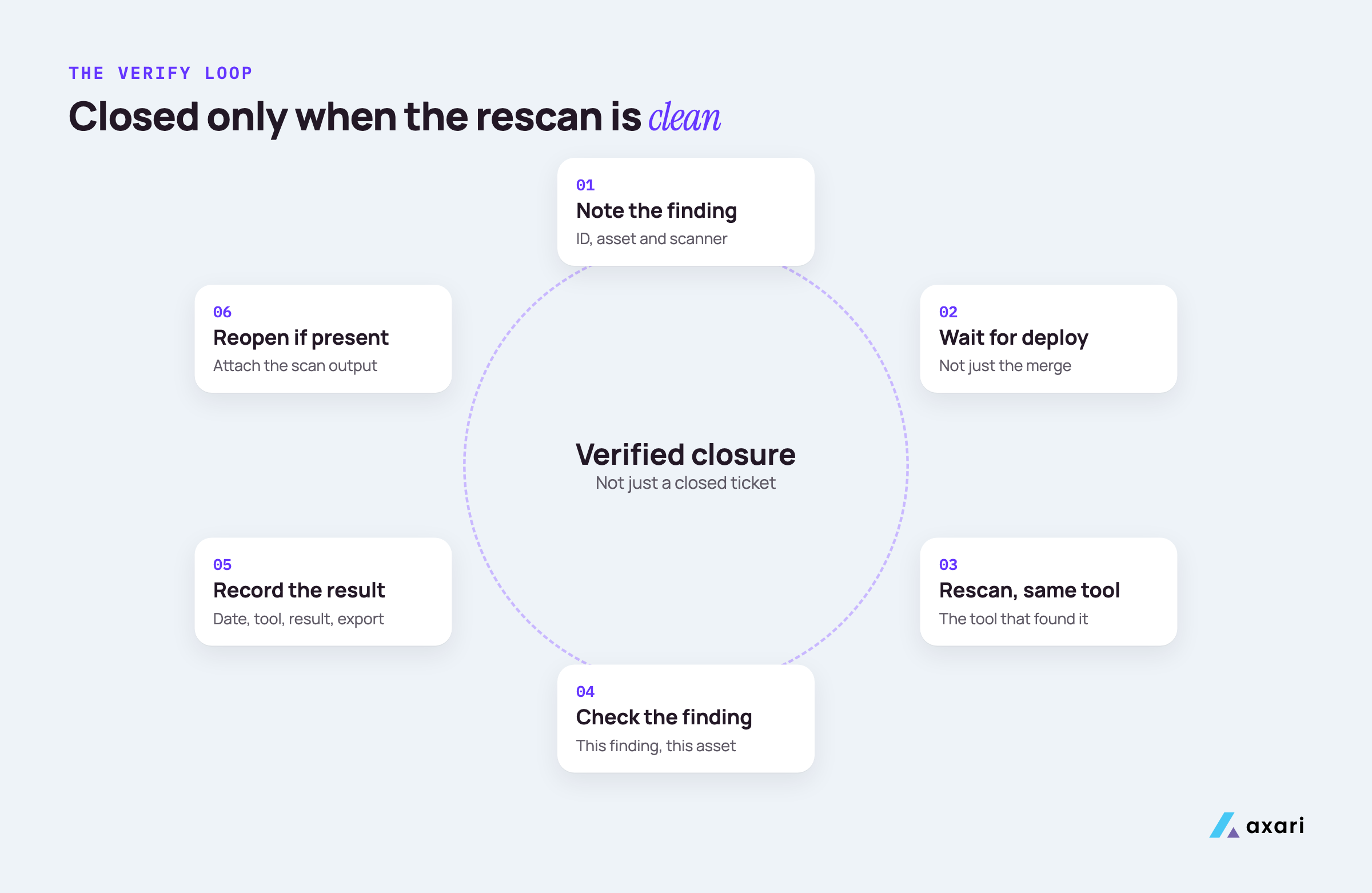
The loop has six steps.
- Note what was found. Record the finding ID, the asset and the scanner.
- Wait for the deploy, not the merge. A fix in a pull request has not reached production yet. Confirm it shipped.
- Rescan with the same tool. If Qualys found it, check in Qualys. A different scanner may check differently and give a false all clear.
- Check the specific finding. A scan that ran proves nothing on its own. You want "this finding, on this asset, is no longer detected."
- Record the result on the ticket. Rescan date, tool, result and an export.
- Reopen if it is still there. Attach the output and one line on what is left.
The record from step 5 is also the proof an auditor will ask for later. For the wider program this loop sits inside, see Vulnerability management for a small security team.
What is remediation verification in vulnerability management?
Remediation verification is the step that confirms a fix removed the vulnerability, usually with a rescan, before the finding counts as closed. It separates work done from risk reduced. Without it, a program measures how fast tickets move, not whether exposure went down, and auditors have no proof that the fix shipped.
When a plumber fixes a leak, you run the tap before you pay. Verification is running the tap. Three words often get mixed up in tickets and reports:
| Word | What it means | Who usually decides |
|---|---|---|
| Remediated | Someone made a change meant to fix the issue | The engineer |
| Closed | The ticket was moved to Done | Whoever owns the ticket |
| Verified | A rescan or test confirms the issue is gone | Security, or the scanner itself |
Most scanners already track this third state. Qualys, for example, marks a vulnerability as Fixed only when the most recent scan no longer detects it after the previous scan did, and as Re-Opened if it comes back, as described in Qualys's vulnerability status documentation. Your policy should say the same: a finding is closed when it is verified, not when its ticket is.
Why is a Jira ticket marked done but the vulnerability still showing in the scanner?
Usually the fix has not reached the asset the scanner checks. Common causes: the change merged but has not deployed, it fixed one host or image but not all of them, a container was rebuilt from an old base image, or the scanner has not rescanned yet. Sometimes the fix was wrong. Check the deployed version first.
Work through the causes in this order:
| Cause | How to check |
|---|---|
| Merged but not deployed | Compare the version in production with the version in the fix |
| Fixed on some hosts, not all | List every asset the scanner still flags |
| Patch installed, reboot pending | Many kernel and operating system patches need a restart |
| Image rebuilt from an old base | Check the base image tag in the Dockerfile and the running container |
| Scanner has not rescanned | Look at the last scan date on the asset |
| Scan cannot see the fix | An unauthenticated scan may only read a version banner |
| The fix was wrong | Compare the installed version with the fixed version in the advisory |
Treat the scanner as the source of truth and the ticket as a claim. The rescan shows whether the change reached the place that matters.
How do you rescan to confirm a vulnerability is fixed?
Trigger a targeted rescan of the asset or repository after the fix deploys, instead of waiting for the next scheduled scan. Match the check to the fix: an authenticated host scan for patches, a dependency scan for libraries, a cloud posture check for misconfigurations and proof of revocation and rotation for exposed secrets. Attach the output to the ticket.
| Fix type | What "verified" looks like |
|---|---|
| Operating system or software patch | An authenticated Qualys, Rapid7 or Tenable rescan is clean on every affected host |
| Library or dependency | The lockfile shows the fixed version, a Snyk re-test is clean and the running image agrees |
| Configuration change | The same check passes, and the setting lives in configuration management so it cannot drift back |
| Cloud misconfiguration | The setting is confirmed in the cloud itself, Wiz or your posture tool no longer flags it and the fix is in the Terraform code |
| Exposed secret | Revoked at the provider, rotated, logs checked for misuse, old credential confirmed dead |
Cloud misconfigurations often come back: fix a public bucket by hand in the AWS console while the code still says "public," and the next deploy undoes it. For checking the live setting and keeping the fix in code, see cloud misconfiguration remediation.
Exposed secrets are never fixed by deleting them from code. GitHub's guide to remediating a leaked secret puts revocation with the provider first, because a deleted secret still works for anyone who already copied it and can stay in commit history.
Who owns vulnerability remediation: security or engineering?
Engineering owns the fix; security owns the process. Security finds, prioritizes, sets SLAs and verifies closure. The team that owns the service is accountable for shipping the fix, and IT owns endpoints and corporate systems. Write this into a RACI with a named owner per asset, so no finding waits for someone to claim it.
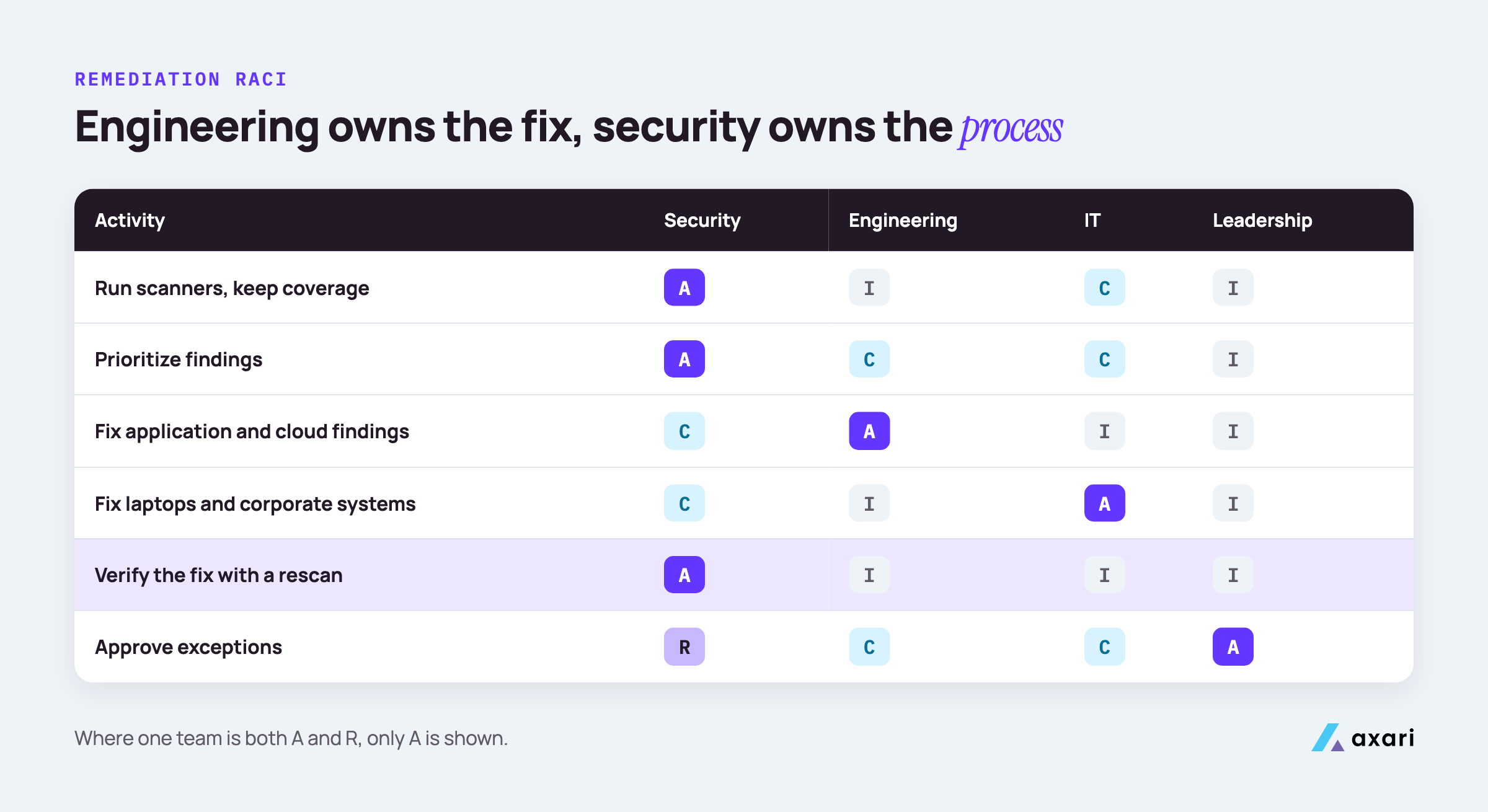
A RACI is a chart of who does what: Responsible (does the work), Accountable (owns the outcome, one per row), Consulted (asked before) and Informed (told after).
| Activity | Security | Engineering team | IT | Leadership |
|---|---|---|---|---|
| Run scanners and keep coverage | A, R | I | C | I |
| Prioritize findings | A, R | C | C | I |
| Fix application and cloud findings | C | A, R | I | I |
| Fix laptops and corporate systems | C | I | A, R | I |
| Verify the fix with a rescan | A, R | I | I | I |
| Approve exceptions | R | C | C | A |
"Engineering team" means a named team per service, written in your asset inventory. For exceptions, "leadership" means the named risk owner or executive sponsor. Verification sits with security, so the person who made the fix is not the only one checking it.
What remediation SLAs should you set by severity?
Set SLAs by priority tier rather than raw CVSS, and pick deadlines your team can meet. A common pattern gives the shortest deadline to critical or KEV-listed findings, then longer ones for high, medium and low. CISA's remediation deadlines bind US federal civilian agencies, not private companies. Count an SLA as met only after a rescan confirms the fix.
An SLA (service level agreement) is the deadline you promise for each tier. Four choices decide whether yours will hold:
- Use your own tiers. If you already sort findings into P1 to P4 using KEV, EPSS and asset exposure, as in CVSS vs EPSS vs KEV: how to prioritize what your team can fix, attach the SLA to those tiers, not to the raw CVSS label: P1 this sprint, P2 next sprint, P3 planned work, P4 a reviewed backlog.
- Start from today. Set the first SLA close to how long fixes in each tier take now, then tighten it.
- Start the clock at detection, so triage time counts and it matches the metrics below. Write it down.
- Stop the clock at verification, not at the ticket's Done date, or your SLA report counts claims.
A note on federal rules. In June 2026, CISA replaced BOD 22-01 with BOD 26-04, which sets federal timelines from asset exposure, KEV status, exploit automation and post-exploitation technical impact. It binds only federal civilian agencies. Borrow the thinking; set your own deadlines.
How do you enforce vulnerability remediation SLAs with engineering teams?
Agree the SLAs with engineering leads first, then make the due date visible on every ticket. Send reminders before the deadline, not after, and escalate missed deadlines to the team lead on a fixed path. An AI Twin in Slack or Teams can draft those follow-ups for your approval, so chasing no longer depends on your memory.
Enforcement works best when everyone knows the path in advance:
| When | What happens | Who hears about it |
|---|---|---|
| Ticket created | Due date set from the SLA, visible on the ticket | The owning engineer |
| Before the due date | A friendly reminder with the ticket link | The owning engineer |
| Due date passes | A note asking for a new date or an exception | The engineer and their team lead |
| Still open after that | Raised in the weekly review | The engineering manager |
| Repeatedly missed | Listed in the monthly report, with the reason | Leadership |
Remind early, because a note before the deadline helps someone plan and one after it reads as blame. Offer the exception route too, so a team that can't make the date asks for more time instead of going quiet. Let software track due dates in Jira and draft each reminder, with a person approving what goes out, so the follow-up keeps going in a week when you are busy.
How do you stop engineers closing tickets before the fix is verified?
Gate closure on a rescan. Add a workflow status such as Fixed, awaiting verification, and move tickets to Done only when the scanner confirms the finding is gone. Some scanner integrations sync this for you. An AI Twin from Axari follows up until the scanner confirms the fix, and nothing on the ticket changes without your approval.
One extra status changes what Done means. A simple Jira workflow:
- To do. The finding is assigned to the owning team.
- In progress. The engineer is working on the fix.
- Fixed, awaiting verification. The change is deployed. This is the last status the engineer sets.
- Done. Security, or an integration, moves it here after a clean rescan.
- Reopened. The rescan still shows the finding, so it goes back with the output attached.
Jira lets you restrict who can make the move to Done. Check your scanner's integration docs too, since some can update linked tickets when a rescan clears a finding.
Where no integration exists, set a weekly check: filter for tickets in Fixed, awaiting verification, rescan those assets and move each one to Done or Reopened.
What SOC 2 evidence do you need for vulnerability remediation?
Keep evidence that matches your policy, since auditors test what it says: scan reports showing coverage, tickets with owners and dates, rescan results proving findings cleared and approved exceptions. Vanta and Drata stay the system of record, and Vanta's agent can now open a Jira ticket, route it to an owner and link it to the Vanta item. The rescan proves the fix.
SOC 2 is an audit of how a company protects customer data. A SOC 2 Type 2 report checks whether controls worked over a period, often several months, so the auditor samples findings from across it. SOC 2 sets no scan frequency or deadline of its own.
For each sampled finding, keep these together:
- the original scan result and the date it was found
- the ticket, with its owner, priority and due date
- the fix date and the rescan date, with the rescan output
- any approved exception, who approved it and when it ends
Vanta's agentic ticketing update, dated August 28, 2026, describes its agent opening Jira tickets from Vanta tests, documents and risk scenarios, routing each to an owner and linking it back. You still need the rescan at the end to show the fix held. For the rest of the audit evidence a lean team gathers, see SOC 2 evidence collection: what a lean team still does by hand. If you also hold ISO 27001, the same records serve its control on technical vulnerability management (Annex A 8.8 in the 2022 edition).
Mean time to remediate vs verified closure rate: which should you track?
Track both, but trust verified closure rate more. Mean time to remediate measures how fast tickets close, which can look healthy while vulnerabilities stay open. Verified closure rate counts only findings a rescan confirmed fixed. Pair it with reopen rate and time to verified fix, and your numbers describe real risk reduction instead of ticket movement.
| Metric | How to calculate it | What it tells you |
|---|---|---|
| Mean time to remediate (MTTR) | Average time from detection to ticket closed | How fast work moves |
| Verified closure rate | Findings confirmed fixed by rescan, divided by findings whose tickets closed, in the same period | How many closures were real |
| Reopen rate | Findings that came back after a clean rescan, divided by all verified fixes (not tickets that failed verification) | Whether fixes hold |
| Time to verified fix | Average time from detection to a clean rescan | How long the risk stayed open |
If tickets close quickly but time to verified fix lags, look at the deploy or the rescan, not the engineers' effort. Report trends by tier, month over month. For a layout that puts verified closure rate in front of leadership, see our CISO board report template.
Frequently asked questions
What is a vulnerability exception and risk acceptance process?
It is the written route for findings you will not fix within SLA. Security runs the process: each request records the reason, compensating controls and an expiry date, a named risk owner or executive sponsor approves it and open exceptions are reviewed quarterly. Auditors expect exceptions to be approved, time-bound and tracked.
Is there a vulnerability remediation RACI template?
Yes. A remediation RACI lists each activity, such as scanning, prioritizing, fixing, verifying and approving exceptions, against security, engineering, IT and leadership, with one accountable owner per row. The RACI table in this article gives you a version to adapt to your own teams.
How do I prove to auditors that vulnerabilities were actually fixed, not just closed?
Show the rescan, not the ticket. For a sample of closed findings, provide the original scan result, the rescan output showing the finding gone and the ticket with its owner and dates. If your policy says a finding closes only after verification, auditors can test exactly that.
Is there a vulnerability remediation SLA policy template?
Yes. A good SLA policy template sets deadlines by priority tier, names owners, defines the exception route and states that a finding only counts as closed after a rescan confirms the fix. Use these as the sections of your own policy and set deadlines your team can meet.
Make verified the new definition of done
This week, add a "Fixed, awaiting verification" status to your security tickets, and write one line into your policy: a finding is closed when a rescan confirms it.
That is how you keep critical vulnerabilities within policy, and what remains is follow-up: re-checking the scanner, reopening what failed and keeping the evidence together. Security tools find the work. Axari makes sure it gets done. An AI Twin carries that follow-up in Slack or Teams, while you keep the judgment. Nothing is sent or changed without your approval. To see it on your own backlog, request a demo. As Jake Bernardes, CISO at Gambit, put it: "I wanted a teammate that actually moved work forward. Not just a copilot."