
Your SOC 2 policy says access is reviewed every quarter. Now you have to do it, across Okta, AWS, GitHub and a long list of SaaS apps, with reviewers who all have other jobs.
A quarterly access review for SOC 2 is a check every three months that each person's access is still needed. Access that is not needed gets removed, and you keep proof of both the decision and the removal. The auditor tests it against what your own policy says.
Covered here: what the criteria ask for, which systems to include, the review steps, the evidence auditors sample and how to get reviewers to answer and removals proven.
What is a quarterly access review for SOC 2?
A quarterly access review is a check, every three months, where the right reviewer confirms that each person's access to a system is still needed and appropriate, and access that is not needed is removed. For SOC 2 it supports the logical access criteria, and the auditor tests that each review happened, was complete and led to removals.
SOC 2 is an attestation report built on the AICPA's SOC framework. An independent CPA firm tests your controls and writes the report. A SOC 2 Type 2 report tests whether your controls operated effectively over a period of months, called the observation window, so every review inside the window can be sampled.
"Logical access" means access to systems and data through accounts and permissions, as opposed to physical access to a building. In the Trust Services Criteria, the AICPA's set of criteria a SOC 2 report is measured against, these sit in the CC6 series.
A review has four parts, and an auditor looks for all of them:
- Population. The full list of accounts, taken from the system itself.
- Decision. A keep or remove call on every line, by someone who knows the work.
- Removal. A ticket for each account marked remove.
- Proof. Evidence from the system that the removal happened.
How often are user access reviews required for SOC 2?
SOC 2 does not set a fixed frequency. The Trust Services Criteria expect access to be reviewed periodically, and the auditor tests against the frequency your own policy states. Quarterly is the common choice, and some teams review privileged and production access more often. Whatever frequency you write, you then have to meet it every cycle.
Don't pick a frequency because it sounds strict. If the policy says quarterly and one quarter has no review, the control did not operate as described, and it can appear as an exception in your report.
So write a frequency you can keep. A clear policy line might read: "Access to in-scope systems is reviewed quarterly. Privileged access to production is reviewed quarterly by the system owner and the security lead."
A few things to decide when you write it:
- What "quarterly" means. Calendar quarters, with a due date such as the last business day.
- Which systems. Name them, or name the rule, such as "all systems in the SOC 2 scope".
- Who reviews. Managers, system owners, or both for admin roles.
- What happens after. Removals within a set number of days, with a ticket.
What do SOC 2 CC6.1, CC6.2 and CC6.3 require for access control?
CC6.1 covers logical access security over systems and data, such as authentication and access restrictions. CC6.2 covers registering and authorizing users before granting access, and removing access when it is no longer authorized. CC6.3 covers authorizing, modifying and removing access based on roles, least privilege and segregation of duties. Periodic access reviews commonly support CC6.2 and CC6.3.
The criteria come from the AICPA's 2017 Trust Services Criteria. The AICPA revised the points of focus in 2022; the criteria themselves stayed the same. Points of focus are guidance on what to consider; you are not required to address every one.
Two terms in CC6.3 are worth knowing:
- Least privilege: people get only the access their work needs, and no more.
- Segregation of duties: one person should not be able to do and approve the same sensitive task alone, such as writing code and pushing it to production with no review.
How an access review connects to each criterion:
| Criterion | In plain words | What the review shows |
|---|---|---|
| CC6.1 | Access to systems is controlled | Every account sits behind your access controls |
| CC6.2 | Users are approved before access, and removed when no longer authorized | Leavers and unknown accounts are found and removed |
| CC6.3 | Access matches roles, least privilege and segregation of duties | Excess or wrong roles are found and reduced |
Which systems should a SOC 2 access review include?
Include every in-scope system that holds customer data or controls production: your identity provider such as Okta, cloud accounts such as AWS, code hosting such as GitHub, databases, and SaaS apps with sensitive data. Review admin and privileged roles separately, and look for direct logins and service accounts that bypass single sign-on, because those are easy to miss.
Single sign-on (SSO) lets people log in to many apps through one identity provider. It rarely covers everything, and access tends to hide in the same places:
| System | What to export | Watch for |
|---|---|---|
| Okta | Users, status, app assignments, admin roles | Contractors and suspended users still assigned |
| AWS | IAM users, roles, IAM Identity Center assignments | Old IAM users with access keys outside SSO |
| GitHub | Organization members, owners, outside collaborators | Outside collaborators, personal access tokens and deploy keys |
| Databases | Database users and their grants | Shared admin logins |
| Sensitive SaaS apps | Users and admin roles from the app itself | Local accounts created before SSO |
For AWS, the IAM credential report lists every IAM user and the state of their passwords, access keys and MFA devices.
Service accounts are used by software, not people, but still belong in the review. Give each a named owner who confirms it is needed and no wider than its job.
How do you perform a user access review step by step?
Export the current user list from each in-scope system and date it. Match accounts to your HR roster to catch leavers and unknown accounts. Send each list to the reviewer who knows the work, usually the manager or system owner. Record a keep or remove decision per line, open a ticket for each removal, then confirm it took effect.
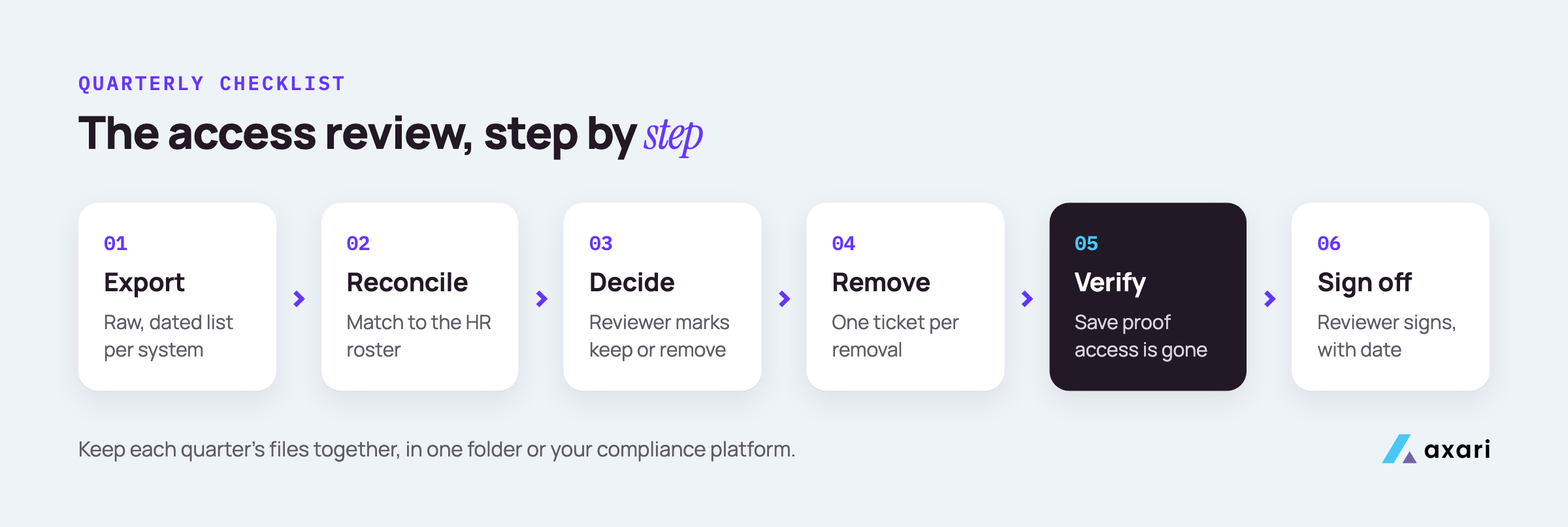
Run it as a checklist each quarter:
- Export. Pull the user list from each system on the same day. Save the raw, unedited file with the system name and date.
- Reconcile. Compare accounts to your HR roster. Flag leavers, unknown names, and accounts with no owner.
- Split by reviewer. Give each manager only their own people. Give each system owner the admin and service accounts.
- Decide. The reviewer marks every line keep or remove, with a short reason for anything unusual.
- Open tickets. Create one ticket per removal in Jira or ServiceNow, linked to the review.
- Remove. The system owner or IT removes the access and closes the ticket.
- Verify. Export the system again, or check the account, and save proof that the access is gone.
- Sign off. The reviewer or security lead signs the completed review with the date.
Keep each quarter's files together in one folder or in your compliance platform, such as Vanta or Drata. If you use Vanta, its access reviews pull account lists, notify reviewers and record decisions, but it cannot currently write changes to your apps, so removals stay with you (more in Is Vanta enough for SOC 2?).
What evidence do auditors want for SOC 2 access reviews?
Auditors want the complete user population and proof of how and when you produced it, usually a dated export from each system. They also want the reviewer's name and decision for each account, the sign-off date, a ticket for every removal, and proof the access is gone. A gap in any one of these can fail the sample.
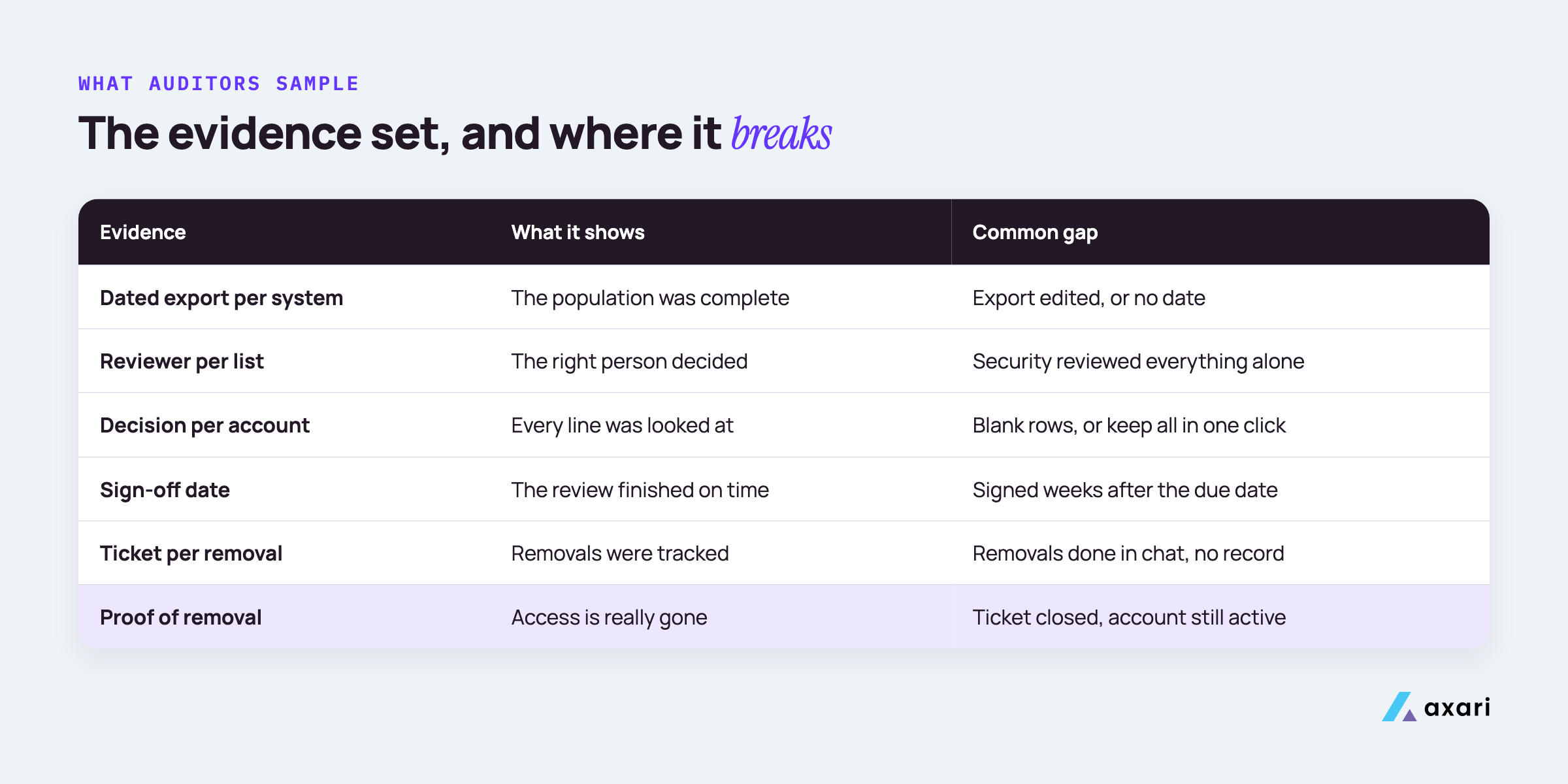
A list you produce is called information produced by the entity, or IPE, and the auditor has to trust it is complete. A raw, dated export from the system beats a list someone typed into a spreadsheet.
The evidence set, and where it usually breaks:
| Evidence | What it shows | Common gap |
|---|---|---|
| Dated export per system | The population was complete | Export edited, or no date |
| Reviewer per list | The right person decided | Security reviewed everything alone |
| Decision per account | Every line was looked at | Blank rows, or "keep all" in one click |
| Sign-off date | The review finished on time | Signed weeks after the due date |
| Ticket per removal | Removals were tracked | Removals done in chat, no record |
| Proof of removal | Access is really gone | Ticket closed, account still active |
Watch for the reviewer who approves their own access. Someone else should review it. For the rest of your SOC 2 evidence, see SOC 2 evidence collection for a lean team.
How do you prove access was revoked after an access review?
Show the change, not only the request. Link each removal decision to its ticket, then attach a fresh export or screenshot from the system, dated after the ticket closed, showing the account disabled or the role removed. An AI Twin such as Axari can re-check the system after the ticket closes and prepare that proof for your approval and upload.
A closed ticket says someone believes the work is done. Auditors want the system to agree:
- Okta: the user's status shows deactivated, or the app assignment is gone.
- AWS: a new credential report or IAM listing shows the user removed or the access keys inactive.
- GitHub: the person no longer appears in the organization's member or collaborator list.
- SaaS apps: the user list from the app, exported after the removal date.
The order matters: the proof must be dated after the ticket closed. Make the re-check a fixed step, so a removal counts as done only once it passes. If the account is still there, go back to the owner. Then file the proof, matched to the ticket and the review, in Vanta or Drata, which stay the system of record.
How do you get managers to complete access reviews on time?
Make the review small, specific and easy to answer. Send each manager only their own people, with a clear keep or remove choice per line and a due date. Ask in the tool they already use, such as Slack or Teams, follow up before the deadline, and report completion to leadership so late reviews are visible.
Most late reviews come from requests that were too big, too vague or buried in email. A few habits help:
- Keep lists short. A manager should see only their direct reports, not the whole company.
- Make each line a choice. Keep or remove, with the person's role and last login next to it.
- Set a date with room. Ask for answers well before the policy deadline, so you have time to remove and verify.
- Remind early. Send one reminder halfway, and another a couple of days before the date. Go to the reviewer's own manager only after repeated misses.
- Make it visible. Share a simple completion list with leadership.
Name a backup reviewer in your policy for when a manager is away.
How do you run access reviews across 40 SaaS apps as the only security person?
Tier the apps. Review everything behind single sign-on in one pass from your identity provider, then review each app's own admin and direct-login accounts separately. Put the apps holding sensitive data on the quarterly cycle and the rest on whatever frequency your policy sets. Give each app an owner, and spend your time on chasing, removals and proof.
Reviewing 40 apps from scratch every quarter is not realistic for one person. Tier them:
| Tier | Which apps | How to review |
|---|---|---|
| 1 | Production, cloud, code, customer data | Quarterly, full export from the app itself |
| 2 | Business apps behind SSO with some sensitive data | Quarterly, from the identity provider, plus admins from the app |
| 3 | Low-risk apps behind SSO | At the frequency your policy sets for this tier |
If an app only accepts SSO logins, removing a person in Okta removes their way in, though open sessions and API tokens in the app can last until they expire. Apps that also allow direct logins need their own export, because a local account can survive an SSO removal.
Write the tiers into your policy, and name an owner for each app.
How do you handle SOC 2 access reviews when everyone at your startup has production access?
Start by documenting why each person needs production access, then reduce it where you can, with role-based groups or just-in-time access for rare tasks. Auditors test against your policy, so if broad access is a deliberate choice, record it as an exception with a reason, the risk owner's approval, compensating controls such as logging and an expiry date.
Early startups often give every engineer production access. That can be acceptable when it is a written, deliberate decision. Work through it in order:
- List who has production access and what they use it for.
- Remove what is not used. Access nobody has touched in months is the easy cut.
- Use groups for roles. Put production access in a role-based group, so adding and removing people is one change.
- Use just-in-time access for rare tasks. Just-in-time access means people request elevated access for a short time and it expires on its own.
- Record the rest as exceptions. For anyone who keeps standing access, note the reason, the risk owner or executive sponsor who approved it and an expiry date. Review open exceptions each quarter.
- Add compensating controls. Logging of production actions, alerts on sensitive changes, and required code review.
Frequently asked questions
What should a user access review template include?
One row per account, with the system, user, role, source export and its date, reviewer, keep or remove decision, decision date, revocation ticket and proof of removal. Keep one copy per quarter. Copy these columns into a spreadsheet and you have a working template.
How do I export users from Okta for an access review?
Pull the user list and each user's app assignments from Okta's admin reports or its API, including status and last sign-in, and save the export with the date it was run. Do the same for AWS IAM and GitHub organization members, because those systems often hold access that Okta does not show.
Should you use a spreadsheet or an access review tool?
A spreadsheet works for a handful of systems if it holds the export date, reviewer, decision, ticket and proof columns and is saved each quarter. A tool helps as apps and reviewers grow, because it pulls user lists and tracks sign-off for you. Auditors look at completeness and proof; the format is up to you.
What should a small company look for in an access review tool?
Look for connectors to the systems you review, a way to assign each list to the right reviewer, reminders, a recorded decision per account, a link from each removal to a ticket, and an export auditors accept. Check that it covers direct logins and admin roles, not only single sign-on apps.
Make next quarter's review the easy one
Before the next cycle, write down three things: the systems in scope, the reviewer for each list, and the due date. Then run the first export early, so you have time to chase answers and verify removals before the deadline.
Managers and system owners make the decisions; the hours go into chasing and checking. Axari is the AI workforce for cybersecurity teams, and the access review is part of one outcome a Twin can own: keeping you audit-ready. It sends each reviewer their list in Slack or Teams, follows up, re-checks each system after removals and prepares the proof for your approval and upload. You keep the judgment, and nothing is sent or changed without your approval. Request a demo to see how a Twin would handle this quarter's review.