
Someone in marketing wants a new tool, procurement wants it signed this month, and the request lands on you. You need to know whether the vendor is safe enough, without a review that drags on for weeks.
A vendor security assessment is how you get there: tier the vendor by what it can reach, read the evidence it already has, send one list of gaps, and put a recommendation in front of the person who owns the risk. They decide. You record it.
Tiering comes first. After that: the steps from intake to decision, how to read a SOC 2 report, what to do when a vendor has none and what your own auditor will ask to see.
What is a vendor security assessment?
A vendor security assessment is a review of how a supplier protects your data and systems, done before you sign and again at renewal. You collect evidence, compare it with your policy, follow up on gaps and record a decision. It is the security part of a third-party vendor risk assessment, which also weighs financial and operational risk.
Third-party risk management, or TPRM, is the wider program: is the vendor financially stable, legally sound, able to deliver? The security assessment asks one narrower question: if this vendor has a bad day, what happens to our data and systems?
What goes in:
- The requester's answers. What the tool does, what data it will hold and what it connects to.
- The vendor's evidence. A SOC 2 report, a standard questionnaire, key policies.
- Your policy. The minimum you expect, such as single sign-on, multi-factor authentication (MFA, a second login step) and encryption.
What comes out is a recommendation from security, a decision from the risk owner, and a record with a date to look again. Expect a short, documented judgment that someone accountable signs off on, with no score attached.
How do you tier vendors so the review fits the risk?
Tier vendors by what they can reach, not by contract value: the data they hold, their access to your systems and how much the business depends on them. Three tiers are enough for a lean team. High tier gets the full review, medium tier a report plus short follow-up, low tier a short intake form and no questionnaire.
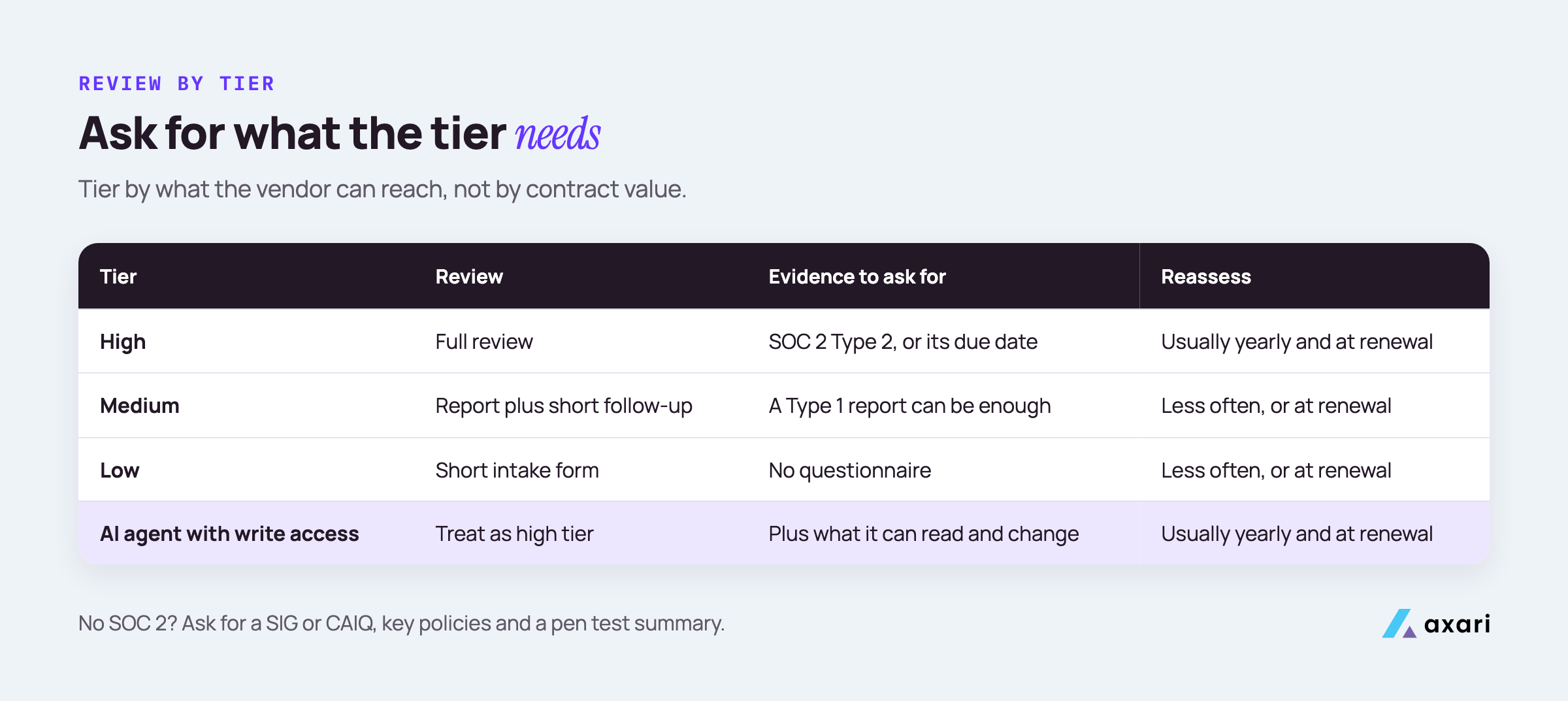
Ask the requester three questions at intake. The highest answer sets the tier.
| Question | High | Medium | Low |
|---|---|---|---|
| What data will it hold? | Customer data, personal data, secrets | Internal business data | Public or no data |
| What can it connect to? | Production, identity (Okta), source code (GitHub), cloud (AWS) | Read access to internal tools | Nothing |
| If it went down, would customers notice? | Yes | Some teams would | No |
A cheap tool with an admin connection to your GitHub organization is high tier. An expensive analytics contract that only sees public web traffic may be low.
Write the tier definitions into your vendor policy, so review depth is a rule rather than a fresh argument.
An AI vendor whose agent can write to your systems belongs in the high tier. The questions to ask AI security vendors cover what to add for those reviews.
What are the steps in a vendor security assessment?
Run every review the same way. Collect the requester's answers about data and access, set the tier, request the evidence that tier needs, read it against your policy, and send the vendor one list of gaps. Then put a recommendation in front of the risk owner, who decides. Record the decision, any conditions and the reassessment date.
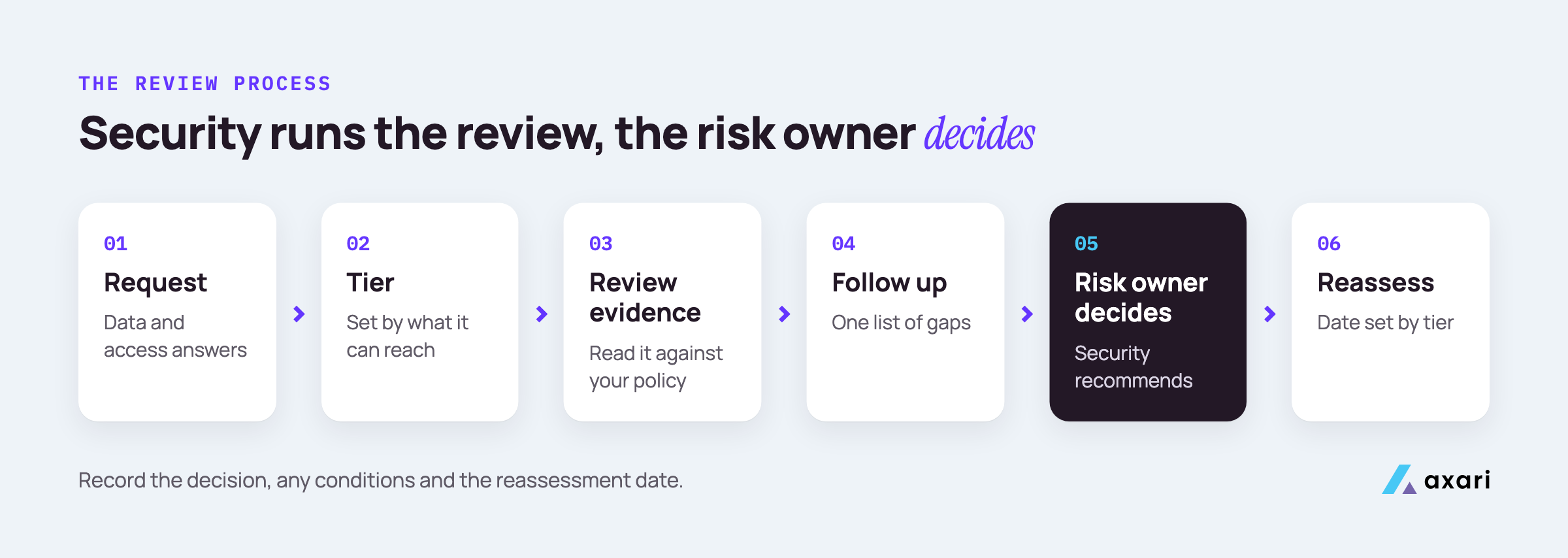
In practice, a review moves through these steps:
- Intake. The requester fills in a short form in Jira, ServiceNow or a Slack workflow: vendor name, purpose, data, connections, business owner and target signing date.
- Tier. Security sets the tier from the intake answers and logs it in the vendor inventory.
- Request evidence. Ask first what the vendor already has. Many publish a trust center, a public or gated page where you can request the SOC 2 report, usually under NDA.
- Read and compare. Check the evidence against your policy and note each gap.
- One gap list. Send the vendor every open question at once, with a reply date.
- Recommend. Write a short recommendation: approve, approve with conditions, or reject, and why.
- Decide and record. The risk owner decides. Security files the decision, the evidence and the reassessment date.
Two habits keep this fast: start at intake, not when procurement asks for a signature, and keep each review in one ticket anyone can check.
How do you review a vendor's SOC 2 report?
Read the auditor's opinion first, then check the report type, the period covered and whether the systems in scope are the ones you will use. Read every exception in the test results, note any subservice organizations carved out of scope, and list the complementary user entity controls you must run. Type 1 covers design; Type 2 covers operation over time.
A SOC 2 report is an independent auditor's report on a service provider's controls, measured against the AICPA's Trust Services Criteria. Read it in this order:
- Opinion. An unqualified opinion is a clean result. A qualified opinion means the auditor found a problem serious enough to call out, so read why.
- Type. Type 1: controls suitably designed on one date. Type 2: they also operated effectively over a period.
- Period. When the period ended tells you how old the evidence is.
- Scope. The system description should name the product and regions you will use.
- Subservice organizations. The vendor's own vendors, such as its cloud host. Under the carve-out method, their controls are excluded from the audit.
- Exceptions. In a Type 2, any test where the auditor found a deviation. Read each one and the vendor's response, and ask whether it touches data or access you care about.
- User entity controls. What the report expects you to do. The next section covers these.
What are complementary user entity controls in a SOC 2 report?
Complementary user entity controls are the controls the vendor's auditor assumes you run on your side, such as approving user access and removing it when people leave. The vendor's controls only work as described if you do your part. Map each one to an owner on your team and keep that mapping with the review record.
They are usually shortened to CUECs, and they sit in a list near the system description. Audit firm Linford & Co. gives a common example: a file-sharing service cannot know when your employee leaves, so removing that person's access is your job.
A simple mapping keeps them from being forgotten. For a typical SaaS vendor it might look like this:
| CUEC in the report | Your control | Owner |
|---|---|---|
| Customers approve who gets access | Access requests by ticket, logins through Okta | IT lead |
| Customers remove access for leavers | Offboarding checklist includes this app | IT lead |
| Customers protect their credentials | SSO and MFA enforced | Security lead |
If a CUEC has no matching control on your side, the gap is yours, not the vendor's. Fix it before go-live or record it as a condition, and recheck the list when a new report arrives.
What if the vendor's SOC 2 report is out of date, or there is none?
If the report period ended recently, ask for a bridge letter: a statement signed by the vendor's management, not the auditor, saying whether controls changed since. Linford & Co. notes they typically cover no more than three months. With no SOC 2 at all, ask for a completed SIG or CAIQ, key policies and a recent penetration test summary.
Linford & Co.'s guide to bridge letters is clear that a bridge letter does not replace the SOC report. It is a management promise covering a short gap.
When the report is old, ask two things. When will the next report be issued? A firm date makes "approve with conditions" easy. And did anything material change, such as new hosting or an acquisition? If so, ask the specific questions the old report cannot answer.
No SOC 2 at all often means a young vendor. Ask what they have: a SIG or CAIQ, policies, a penetration test summary (a report from testers hired to attack the product) and an audit timeline. A SOC 3 report is a public summary without the test results, so it does not show exceptions. For a high-tier vendor, make the audit date a recorded condition.
Should you send vendors the SIG, the CAIQ or your own questionnaire?
Accept what the vendor already has before sending your own. The SIG is Shared Assessments' licensed questionnaire, with a shorter Lite version for lower-risk vendors. The CAIQ is the Cloud Security Alliance's yes-or-no questionnaire mapped to its Cloud Controls Matrix and used for its STAR Registry. Send a short custom form only for what remains.
Shared Assessments pitches SIG Lite at basic due diligence and first-pass reviews, and SIG Core at third parties that handle your most sensitive or regulated data. The CAIQ is a set of yes-or-no questions a customer or auditor can put to a cloud provider; the Cloud Controls Matrix is the CSA's catalog of cloud security controls.
What to ask for, by tier:
- High tier. A current SOC 2 Type 2 plus a SIG Core or CAIQ, then custom questions on how you will use the product.
- Medium tier. A SOC 2 report, a SIG Lite or a CAIQ, plus a few follow-ups.
- Low tier. Your intake form only.
Treat questionnaire answers as claims, not proof. Pick the few that matter most, such as MFA for admin access, and ask for evidence on those. Your own sales team fields the same forms from buyers; answering security questionnaires faster covers that side of the exchange.
How do you follow up with vendors on security gaps without the review stalling?
Send the vendor one consolidated list of gaps, each with the evidence you need and a reply date, not a drip of emails. Track every gap with an owner on both sides. An AI Twin in Slack or Teams can follow up with the requester and keep each gap's status current, with your approval before anything is sent.
A gap list that gets answered looks like this:
| Gap | Why it matters | What we need | Vendor owner | Reply by |
|---|---|---|---|---|
| Admin MFA not stated | Admins can reach our data | Screenshot or policy extract | Their security lead | Agreed date |
| Exception in access review testing | Touches user access | Their remediation note | Their compliance lead | Agreed date |
The requester owns the vendor relationship and is copied on every chase. Escalate as you would inside the company: a direct reminder to the vendor contact first, the requester's manager only after repeated missed dates.
If you are the only security person and reviews take weeks, fix the structure. Low-tier vendors never wait for you. Higher tiers start at intake, alongside legal review. And a few open gaps need not hold up signing: the risk owner can approve with dated conditions, tracked to closure.
Who should approve a high-risk vendor, and how do you record the decision?
The risk owner decides, usually the business leader who wants the vendor or an executive sponsor for high-tier vendors; security runs the review and recommends. Record approve, approve with conditions or reject, with the reasons, compensating controls, the evidence reviewed and an expiry or reassessment date. Open conditions are tracked like any other exception.
Security makes the risk clear; it does not own the business decision. A good recommendation fits on one screen: what the vendor reaches, what the evidence showed, open gaps and the recommended outcome.
A compensating control is something you do on your side to reduce a risk you cannot remove at the vendor, such as limiting the data you send or restricting the app to a small group.
What the decision record holds:
- Vendor, tier and business owner.
- Evidence reviewed, with dates, and how each gap was resolved.
- The decision, who made it and when.
- Conditions with owners and due dates, plus compensating controls.
- The reassessment or expiry date.
Treat a condition the same way as any risk exception: it has a reason, compensating controls and an expiry date. Open exceptions are reviewed quarterly. New exception requests for high-tier vendors go to the monthly leadership review.
What vendor management evidence does a SOC 2 auditor expect?
SOC 2 criterion CC9.2 asks you to assess and manage risks from vendors and business partners, and auditors test what your own vendor policy says. Keep the inventory with tiers, each review's evidence, the decision and its reassessment date. Axari's Twin can gather those records and prepare them for your approval and upload to Vanta or Drata.
Audit firm Linford & Co. quotes the criterion as "The entity assesses and manages risks associated with vendors and business partners" in its guide to SOC 2 vendor management. The criterion sets the goal; your vendor policy sets the detail, and that detail is what gets tested.
What to have ready:
- The vendor policy. Tiers, review depth, who approves and how often you reassess.
- The inventory. Every vendor in scope, with tier, owner and next review date.
- Review records. For any vendor an auditor picks: intake, evidence, gap list, recommendation and decision.
- CUEC mapping and proof that reassessments happened on time.
Keep these in your system of record, whether Vanta, Drata or a shared drive. Is Vanta enough for SOC 2? covers what a platform handles and what still needs a person. Vendor records follow the same habits as the rest of your audit evidence, which our guide to SOC 2 evidence collection for a lean team walks through.
Frequently asked questions
How often should you reassess vendors?
Set the cadence by tier in your vendor policy: high-tier vendors usually every year and at renewal, lower tiers less often or only at renewal. Reassess early after a vendor breach, a major change to the service or new data being shared. SOC 2 does not fix a frequency; auditors test what your policy says.
Is a SOC 2 Type 1 report enough to approve a vendor?
A Type 1 report can be enough for a medium or low tier vendor, or a young vendor with a Type 2 underway. It shows controls were suitably designed at one point in time, not that they operated over a period. For a high-tier vendor, ask when the Type 2 is due and make it a condition.
What should a vendor security assessment questionnaire include?
Keep it short: data handled, access to your systems, hosting and subprocessors, encryption, access control and MFA, logging, incident response and breach notification, vulnerability management, business continuity, and which reports the vendor holds. Drop any question a current SOC 2 report, SIG or CAIQ already answers, and scale the rest to the tier.
Do AI vendors need a different security review?
Use the same process and tiers, then add the questions specific to AI: what the system can read and change, which actions need approval, whether your data trains any model, which model providers process it and what the audit log records. Treat a vendor whose agent can write to your systems as high tier.
Start with your next five vendor reviews
Write your three tiers into the vendor policy this week, then run the next review through the seven steps and file the record where your auditor will look for it.
Vendor reviews are audit evidence, so the outcome worth owning is keeping the company audit-ready. Axari is the AI workforce for cybersecurity teams. Each person gets an AI Twin in Slack or Microsoft Teams that follows up with requesters, keeps the gap list current and prepares the decision record for your approval and upload. You and the risk owner keep the judgment, and nothing is sent or changed without your approval. Request a demo to see how a Twin handles vendor reviews.