
You lead security at a company of a few hundred people, perhaps alone. You have an IT team, maybe an MDR provider watching alerts, and a lawyer you could call. What you may not have is a written answer to one question: if ransomware hits tonight, who does what?
A ransomware response plan is that answer. It names who decides, who acts and who speaks, and it sets the order of the first hours, following the steps in CISA's #StopRansomware Guide.
What follows is written for a team of 1 to 15: roles, the first steps, containment that keeps evidence, communication, reporting, backups, tabletops and readiness. Treat it as general guidance; for legal questions, ask your counsel.
What is a ransomware response plan?
A ransomware response plan is a short written agreement on who decides, who acts and who speaks if ransomware hits, and in what order. It names the incident lead, the people who isolate and restore systems, who decides on notifications, and how you reach each other if email is down. Keep a printed copy offline.
It is the page people reach for when the usual tools are gone, so keep it short enough to read under pressure.
A workable plan holds six things:
- Roles and backups. Every role named, each with a backup.
- Contacts. Phone numbers for the team, your MDR provider, outside counsel, your cyber insurer and key vendors, kept outside your email.
- An out-of-band channel. A phone bridge or separate messaging account, set up in advance, for when email and chat can't be trusted.
- The order of work. The first-hours steps, each with an owner.
- Restore order. Which systems come back first, and where their backups live.
- Decision rights. What the incident lead may approve alone, and what goes to leadership.
"Printed and offline" matters because ransomware can encrypt the file share your plan lives on. Give paper copies to the incident lead and their backup, and replace them when the plan changes.
Who does what in a ransomware response?
The security lead holds incident command and sets the order of work. IT and engineering execute: isolating systems, resetting access and restoring from backup. Legal and leadership decide on notifications, external communication and any contact with the attackers. An MDR or MSSP provider, if you have one, watches and investigates alerts. Name a backup for every role.
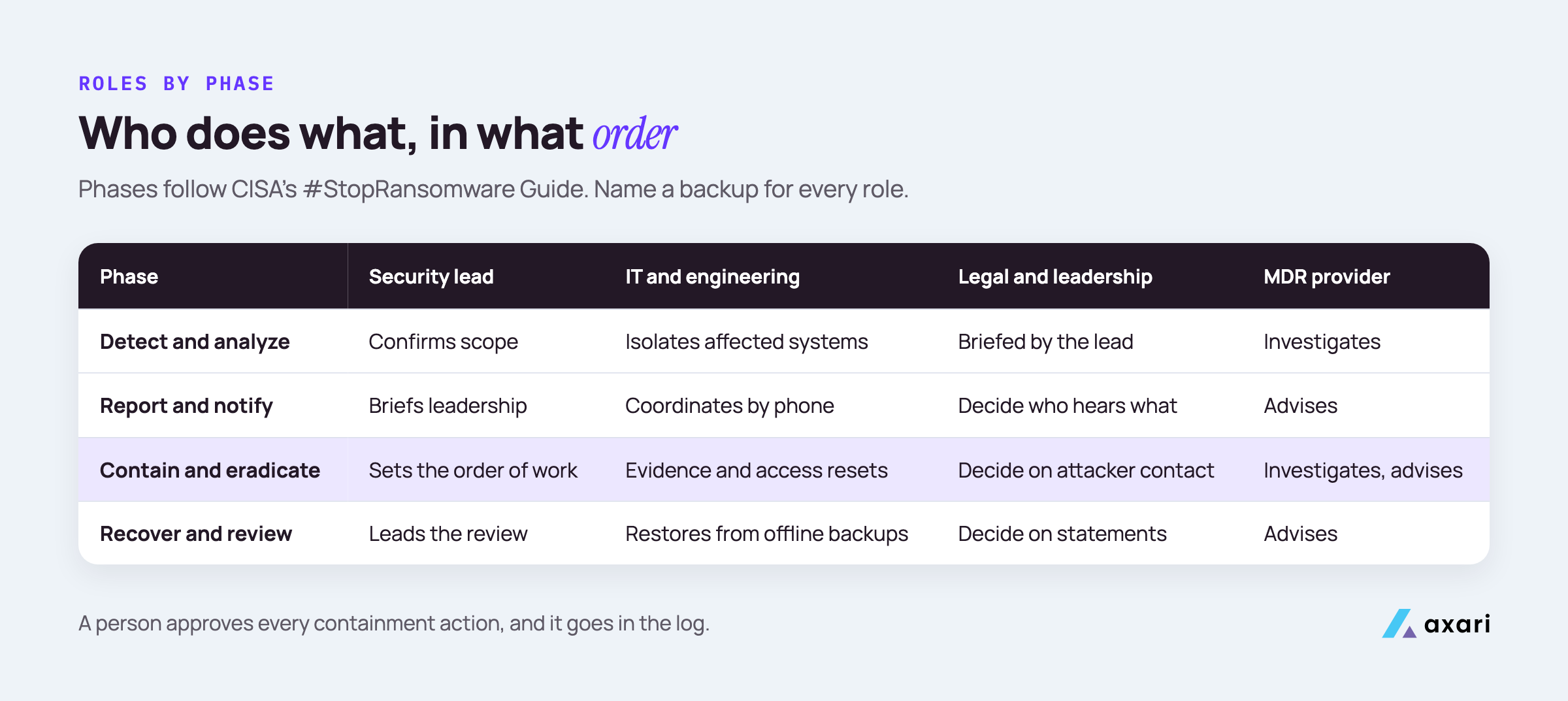
How those roles map onto a team of 1 to 15:
| Role | Who | Decides or does |
|---|---|---|
| Incident command | Security lead, with a named backup | Sets the order of work, approves containment, keeps the timeline |
| Execution | IT and engineering | Isolate systems, reset access, rebuild and restore |
| Monitoring and investigation | MDR or MSSP provider (if any), or an incident response firm | Watches and investigates alerts, finds scope and entry point |
| Notifications and payment questions | Leadership with legal counsel | What staff, customers, insurers and regulators hear, and when; any contact with the attackers |
Take a 300-person company with one security person and an MDR provider. Say the provider calls at night about encrypted files on a server. The security lead takes command, asks IT to isolate the affected segment, calls counsel and briefs the CEO, while the provider investigates. Nobody talks to customers yet, because that call belongs to leadership and counsel.
A solo lead cannot command and execute at the same time. Security team of one covers what to keep and what to hand off; for ransomware, keep incident command and hand the hands-on work to IT and engineering.
What should you do first in a ransomware attack?
Confirm what is affected, then isolate it: disconnect systems from the network rather than powering them down, because CISA's #StopRansomware Guide warns that powering down loses evidence held in volatile memory. Move coordination to phone or another out-of-band channel, start an incident log with times, call your MDR provider and counsel, and brief leadership. Wipe nothing yet.
It often starts as an alert, such as your EDR flagging thousands of files renamed in minutes. Separating a real incident from noise is the job of security alert triage. Once encryption or a ransom note is confirmed, switch to this plan.
The first hour, in the order CISA's #StopRansomware Guide sets out, with an owner for each step:
- Confirm scope (security lead with the MDR provider): which machines, accounts and cloud resources.
- Isolate (IT, approved by the security lead): take affected machines off the network. If several systems or subnets look affected, CISA advises taking the network offline at the switch level.
- Power down only as a last resort. CISA says to do this only if a device cannot be disconnected, since you lose whatever evidence sits in volatile memory.
- Move to the out-of-band channel (everyone), so the attacker does not see your response.
- Start the log (scribe): time, action, who approved it.
- Call out (security lead): the MDR provider, counsel and, if your policy asks for prompt notice, your insurer.
- Brief leadership (security lead): what you know, what you don't, and when the next update comes.
How do you contain ransomware without destroying evidence?
Isolate before you clean. Disconnect affected machines or network segments, snapshot affected cloud volumes, and capture disk images and memory from a sample of affected systems, as CISA's guide recommends. Reset compromised accounts and revoke their sessions. A person approves every containment action and it goes in the log, because a rushed rebuild can erase how the attacker got in.
Approval goes faster when the plan says in advance who approves what:
- The security lead approves: isolating machines or segments, disabling accounts, revoking sessions and tokens, blocking an address or domain.
- Leadership agrees, quickly: keeping a customer-facing service or the whole network down beyond the first emergency step.
Every action goes in the log. A hypothetical entry: "02:40, disabled the backup service account in Okta, approved by the security lead, reason: used to move between servers."
On evidence, CISA's guide gets specific. Snapshot cloud volumes to keep a point-in-time copy, and image the disk and capture memory on a sample of affected devices before anyone rebuilds them.
Then reset access: privileged accounts first, then service accounts, then the rest, including Okta sessions, AWS access keys and GitHub tokens. A current quarterly access review tells you who holds admin rights before you need to know.
What belongs on a ransomware incident response checklist?
Follow the order in CISA's #StopRansomware Guide: detect and analyze by finding and isolating affected systems, report and notify, contain and eradicate by capturing evidence, closing the entry point and resetting access, then recover from offline backups and review what happened. Next to each step, write the role that owns it, so the checklist doubles as your who-does-what sheet.
| CISA phase | Key steps | Owner |
|---|---|---|
| Detection and analysis | Find affected systems, isolate them, triage for restore | Security lead, IT, MDR provider |
| Reporting and notification | Report to agencies, notify the insurer, decide on notices | Leadership with legal counsel; the security lead supplies the facts |
| Containment and eradication | Capture evidence, close the entry point, reset access | IT and engineering, approved by the security lead |
| Recovery and post incident activity | Restore from offline backups, verify, review | IT and engineering; the security lead runs the review |
Copy it into your plan with a name and a backup for each owner.
For recovery, rebuild from known-good images, restore data from backups taken before the attacker got in, and reconnect a system only after its credentials are changed and it has been checked.
NIST SP 800-61 Revision 3, published in April 2025, places incident response inside your wider risk management under the NIST Cybersecurity Framework 2.0. For a small team, that means each lesson from the review becomes a task with an owner and a date.
How do you communicate during a ransomware incident?
Assume the attacker can read your email and chat, and coordinate by phone or a separate channel agreed in advance. The security lead gives leadership one timeline at set intervals. Legal and leadership decide what staff, customers, insurers and regulators hear, and when. Nobody else speaks externally, and every statement is checked against the incident log first.
CISA's guide recommends out-of-band methods, such as phone calls, so you don't tip off the attackers. Set the channel up in advance and test that everyone can join.
A status update the security lead can send at a fixed interval, such as hourly on the first night:
Status, 06:00. What we know. What we don't know yet. What we are doing next, and who owns it. Decisions we need from leadership. Next update at 07:00.
Leadership and legal counsel decide what each audience hears:
- Staff: what to do and not do, such as not posting about the incident.
- Customers and partners: what is affected and what they should do.
- Insurer: notice as your policy requires.
- Regulators and law enforcement: see the next section.
Two rules prevent most mistakes. Nobody replies to the attackers on their own. And no statement goes out until it is checked against the incident log.
Who do you report a ransomware attack to?
In the US, report to CISA, your local FBI field office, the FBI's Internet Crime Complaint Center (IC3) or a US Secret Service field office. CISA says one report is enough for the other agencies to be notified. State, sector, securities or privacy rules may add separate obligations with their own deadlines, and legal decides those with outside counsel.
CISA's report ransomware page says a victim "only needs to report their incident once" for the other agencies to be notified. The FBI's Internet Crime Complaint Center takes reports at ic3.gov. CISA's guide also suggests asking federal law enforcement whether a decryptor exists for the variant you are facing, since researchers have broken the encryption of some.
Have this ready when you report:
- The timeline from your incident log, and affected systems and accounts.
- The ransom note and any contact or payment details the attackers gave.
- Indicators your MDR provider found, such as file names and IP addresses.
On payment, the FBI's public service announcement on ransomware says "The FBI does not advocate paying a ransom" and urges victims to report whether or not they pay. Payment can also carry sanctions risk: the US Treasury's Office of Foreign Assets Control (OFAC) has warned that paying a sanctioned person or group can violate US law. Any payment question goes to leadership and legal counsel.
Outside the US, your national cyber agency plays this role. Which reports you owe, and by when, depends on your country, sector and contracts, so ask counsel.
How do you test backups for ransomware recovery?
Test by restoring, not by checking that the backup job succeeded. Restore a critical system into an isolated environment, confirm it works and record how long it took. CISA's guide recommends offline, encrypted backups whose availability and integrity you test regularly. Repeat on a schedule, and keep at least one copy your everyday admin accounts cannot change.
A restore test tells you whether you can get a system back and how long that takes.
- Pick one critical system, such as the database behind your product.
- Restore it into an isolated environment from the backup you would really use, not a convenient copy.
- Check it works: the application starts and the data is current to the expected point.
- Record the result: system, backup source, backup date, time to restore, and anything that broke.
- Turn each problem into a task with an owner and a due date.
Then check the backups themselves. At least one copy should be offline or unchangeable, behind credentials separate from your everyday admin accounts, since attackers often go after backups. Keep the backup console's own access details in your offline notes too.
How do you run a ransomware tabletop exercise for a small business?
Gather the people who would actually respond, including legal and leadership, walk through a realistic scenario, and pause at each decision: who calls whom, who approves isolation, who talks to customers. CISA publishes tabletop exercise packages that include ransomware scenarios. Write every gap down as a task with an owner and a due date.
CISA's tabletop exercise packages come with template objectives, scenarios and discussion questions you can adapt.
A first exercise fits in an hour or two. Invite the security lead, IT, an engineering lead, leadership and legal counsel, plus your MDR provider if they will join. Then walk through prompts like these:
- "It's 2 a.m. and the MDR provider calls about encrypted servers." Who answers, and who do they call?
- "Email is not safe." Does everyone know the out-of-band channel?
- "The attackers email the CEO directly." Who decides what happens next?
Have the scribe record gaps rather than minutes. The output is a short list, such as "nobody has counsel's mobile number", each turned into a task with an owner and a due date before people leave the room.
How do you keep ransomware readiness on track?
Treat readiness as program work with owners and dates: a restore test for each critical system, a yearly tabletop, a contact list checked every quarter, and a plan review after any change in team or providers. An AI Twin can chase the owners of open readiness tasks and prepare the evidence for your approval and upload.
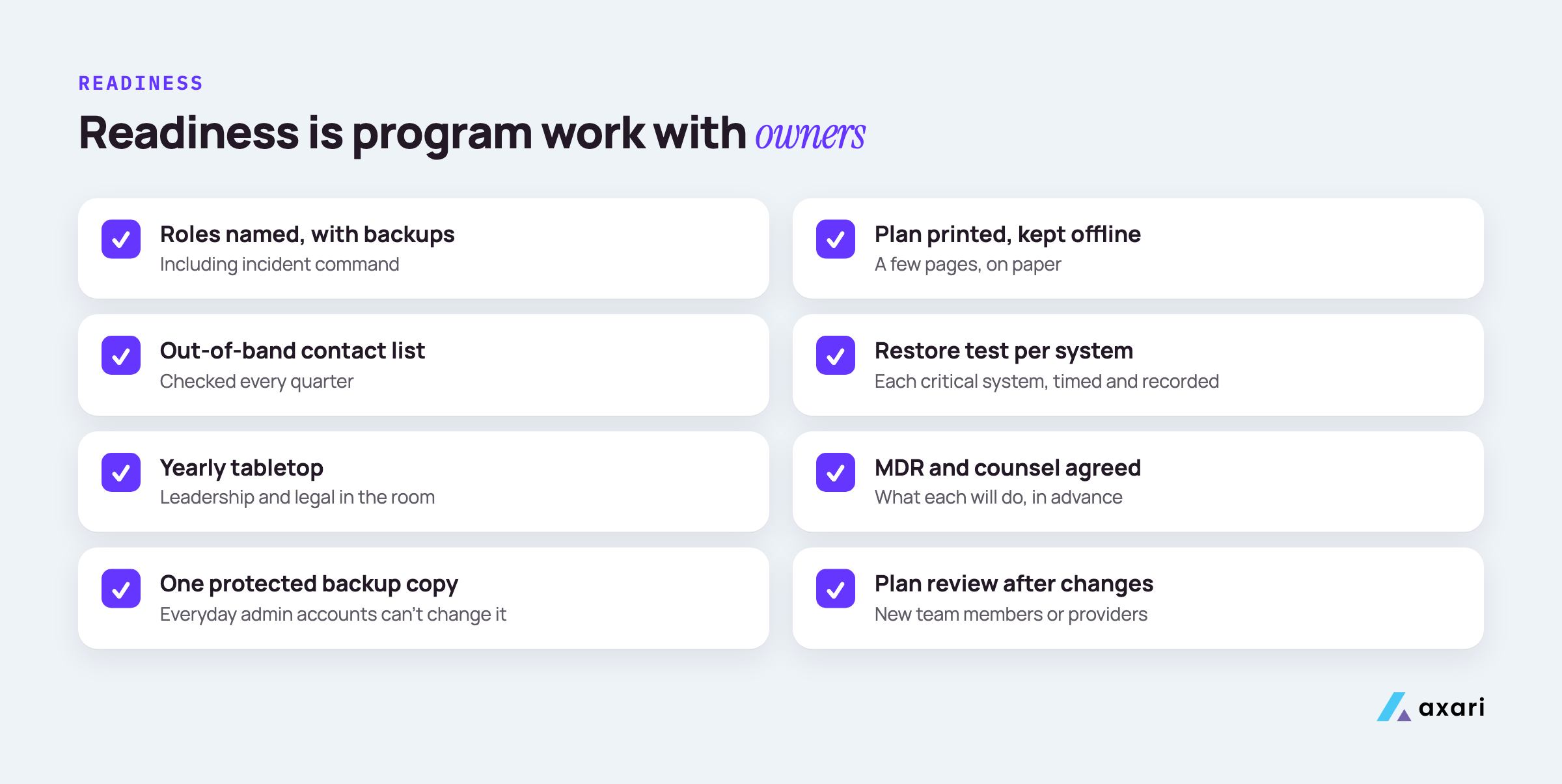
Without owners, readiness work slips. A checklist to track like any other program work:
| Task | Owner | Cadence | Done means |
|---|---|---|---|
| Restore test for each critical system | IT lead | As your plan sets, at least yearly | Restored, working, time recorded |
| Tabletop exercise | Security lead | Yearly | Every gap logged as a task with an owner |
| Contact list check | Security lead | Quarterly | Every number confirmed |
| Plan review | Security lead | After any team or provider change | New version printed and stored offline |
Keep these tasks where the rest of your program lives, in Jira or your GRC platform, with due dates.
The records help in two places. Boards ask how quickly the company could recover, so your last tested restore and last exercise belong in your CISO board report. And if your SOC 2 scope covers incident response and recovery, restore results and tabletop notes become audit evidence; SOC 2 evidence collection for a lean team shows how to keep it current.
Frequently asked questions
Should a company pay a ransomware ransom?
That decision belongs to leadership with legal counsel, not the security team alone. The FBI's 2019 public service announcement says it does not advocate paying a ransom, partly because payment does not guarantee you regain access to your data, and it urges victims to report either way. Counsel should assess the legal risk, including US sanctions rules on payments to sanctioned groups.
How does NIST SP 800-61 relate to CISA's ransomware guidance?
NIST SP 800-61 Revision 3, finalized in April 2025, is general incident response guidance built on the NIST Cybersecurity Framework 2.0, and it supersedes Revision 2 from 2012. CISA's #StopRansomware Guide is the ransomware-specific checklist. Use NIST to shape how your program handles incidents and CISA for the ransomware steps.
Is there a ransomware response plan template?
Start from the response checklist in CISA's #StopRansomware Guide and add what it cannot know: names and backups for each role, your out-of-band contact list, your MDR provider's and counsel's numbers, and the order in which critical systems come back. Keep it to a few pages, printed and stored offline.
How should a solo security lead prepare for ransomware?
Write a short plan with named roles, agree in advance what your MDR provider and outside counsel will do, test one restore, and run a tabletop with leadership. One person cannot run every step at once, so name a backup for each role, including incident command, and keep the contact list current.
Make readiness part of the program
This week, write a name and a backup next to each role, and print the contact list. Then book one restore test and one tabletop, each with an owner and a date.
Ransomware readiness is program work, and the outcome is keeping critical initiatives on track: restore tests run, tabletop gaps closed, contacts current. Axari is the AI workforce for cybersecurity teams. An Axari AI Twin chases the owners of open readiness tasks in Slack or Microsoft Teams, re-checks that each one is done and prepares the evidence for your approval and upload. You keep the judgment and incident command, and nothing is sent or changed without your approval. To see how it would fit your program, request a demo.