
Your EDR or your MDR provider looks at an alert overnight and decides it is real but contained. The note that reaches you says a laptop is missing a patch and a service account has more access than it needs. Then the note sits in a shared inbox, and weeks later the same alert fires again.
Security alert triage is the step where someone decides whether an alert is real, how urgent it is and who acts next. On a small team, that verdict kicks off most of the work.
The sections below follow an alert from first look to closure: the triage steps, who does each one, what each verdict needs next, how to tune noisy rules safely and when an alert counts as resolved.
What is security alert triage?
Security alert triage is the step where someone looks at an alert and decides whether it is real, how urgent it is and who acts next. It ends in a verdict: a real threat, a real but harmless event, a false alarm, or not yet known. For a small team, most of the work comes after the verdict.
An alert is a signal from a detection tool: a SIEM (security information and event management, which collects logs), an EDR (endpoint detection and response, which watches laptops and servers), or a cloud or identity service such as AWS or Okta.
Tools name the verdicts differently. Microsoft Defender XDR, for example, classifies alerts as true positive, "informational, expected activity" or false positive. In plain terms:
| Verdict | What it means | What comes next |
|---|---|---|
| Real threat | Malicious activity is happening | Incident response |
| Real but harmless | Accurate alert, allowed activity | A note in your baseline or runbook |
| False alarm | The rule fired on the wrong thing | A tuning change |
| Not yet known | Not enough context to decide | More investigation, with an owner and a time limit |
The person who makes the call often has to chase what follows too, and that second half is where alerts stall.
What are the steps in the alert triage process?
Most teams follow four steps. Classify the alert by type, validate it with context such as the affected asset, the user and related events, prioritize it by severity and business impact, then assign it. Write those steps into a one-page runbook for each common alert type, so whoever is on shift makes the same call.
The four steps on one hypothetical alert: Okta flags a sign-in for a finance user from a country where you have no staff.
- Classify. A suspicious sign-in, so use the account takeover runbook.
- Validate. Is the user traveling? Did they pass MFA (multi-factor authentication)? Did the account sign in from home minutes earlier? Any EDR alerts on their laptop?
- Prioritize. A finance user with payment access matters more than a test account. Tool severity is a starting point; business impact decides.
- Assign. Name who acts next: the security lead if it looks like account takeover, IT if the user just needs a password reset and a conversation.
The runbook keeps this consistent. If two people would make different calls on the same alert, the runbook is missing a question. The FAQ at the end lists what belongs on it.
Who should triage security alerts in a small company?
Triage belongs to whoever watches the alerts: the security team, the detection logic in your SIEM or EDR, or an MDR provider if you have one. A team of 1 to 15 can hand overnight monitoring and investigation to an MDR provider and keep incident command, risk decisions and fixes in-house, with the security lead accountable for both.
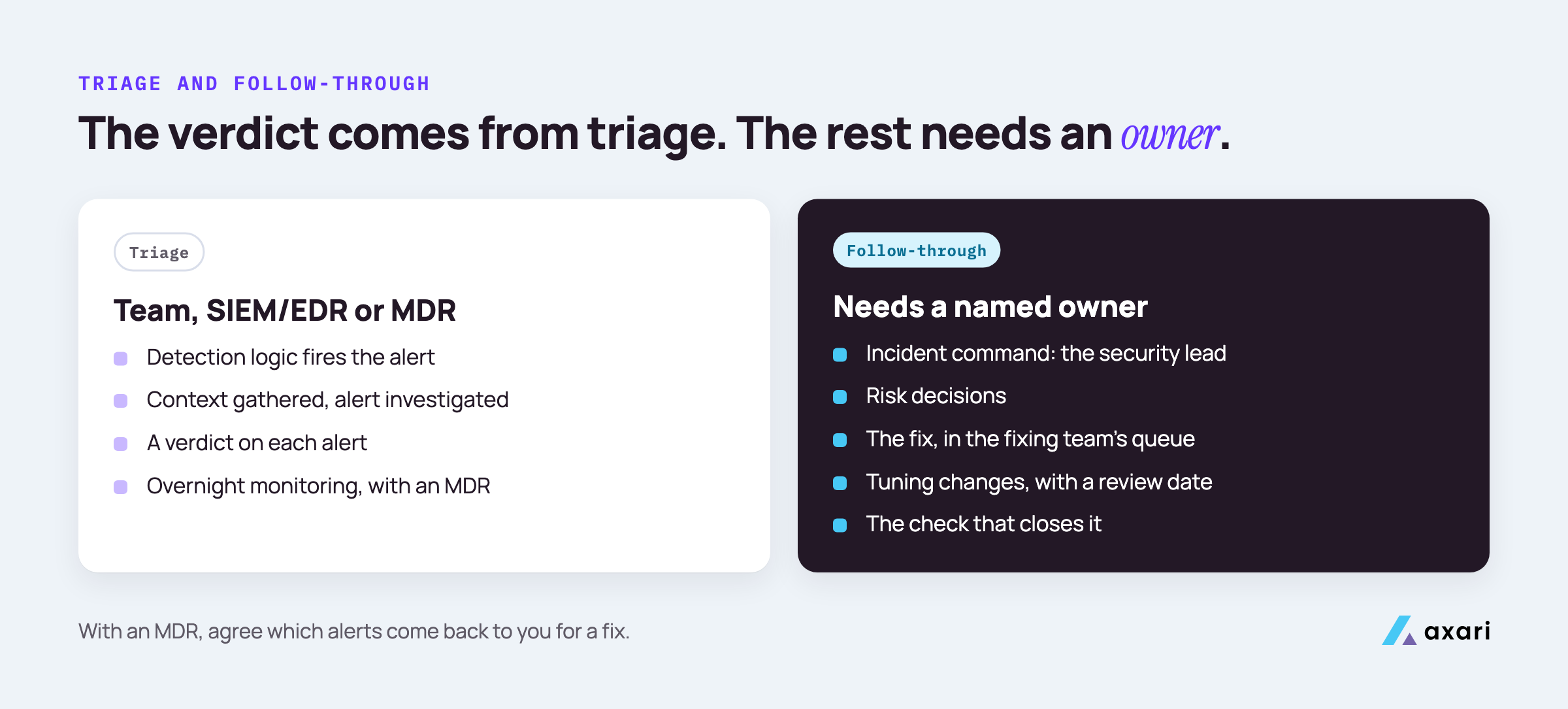
MDR stands for managed detection and response: an outside provider that watches and investigates your alerts and tells you what to do.
A clear split:
| Who | What they own |
|---|---|
| Detection rules in the SIEM or EDR | Raising, grouping and scoring alerts |
| MDR or MSSP provider (if any) | Watching and investigating alerts |
| Security lead | Incident command, risk decisions, the final say on priorities |
| IT and engineering | Carrying out fixes and containment steps |
| Legal and leadership | Decisions on notifications and external communication |
Draw the line between investigation and fixing. A provider can tell you a server needs a patch, but it usually cannot apply the patch or decide it waits until after a release.
If you are the only security person, this is part of a wider question about what to keep and hand off, covered in the guide to running a security team of one. Write the split down, including what the provider sends back to you.
What happens after a security alert is triaged?
Each verdict has its own next step. A confirmed threat becomes an incident under the security lead's command. An alert that exposes a weakness, such as a missing patch or an over-permissioned account, becomes a remediation ticket. A false alarm becomes a tuning change, and a harmless event updates your baseline. Each one needs an owner and a check.
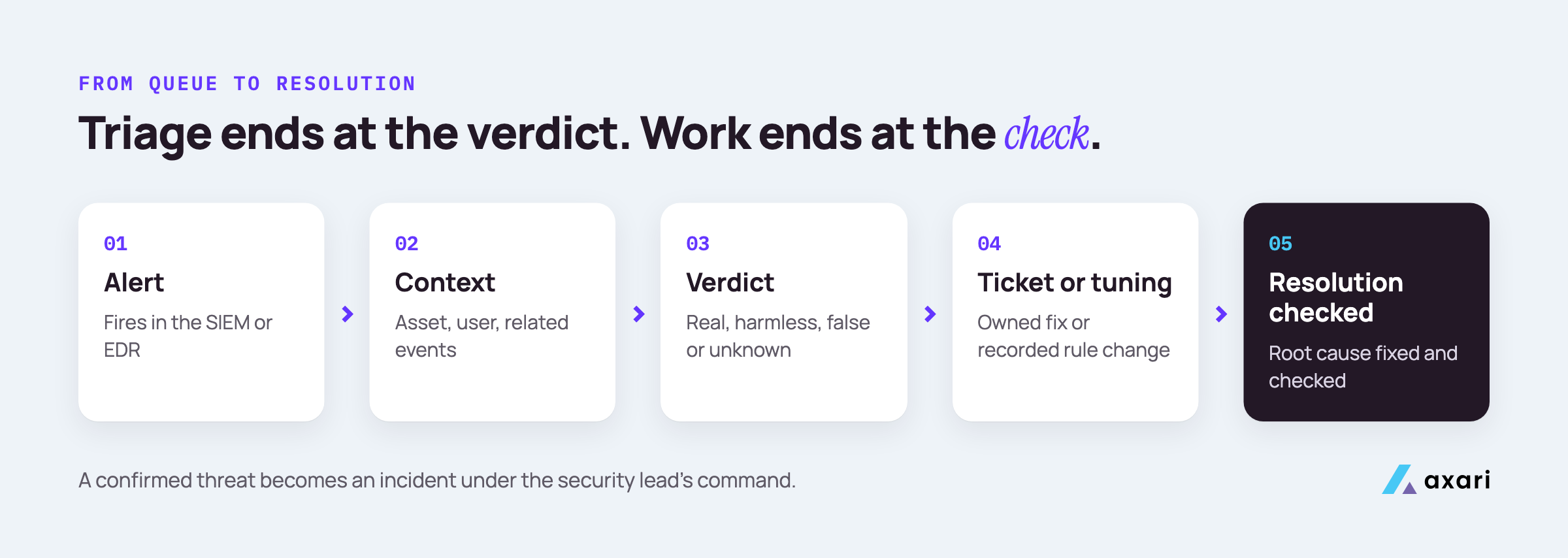
What each path needs to be finished:
- Incident. The security lead takes command, IT and engineering carry out the steps, and legal and leadership decide on notifications. Consequential steps such as disabling an account, revoking sessions or isolating a laptop are a person's decision. A ransomware response plan is a good test of whether your incident plan holds up.
- Remediation ticket. The weakness becomes a finding, with an owner, a due date and a check that the fix worked.
- Tuning change. The rule gets a narrow exception, recorded with a reason and a review date.
- Baseline update. The runbook gets a line saying this activity is expected, from whom and why.
Incident response runs only for confirmed threats. Many other alerts still leave work behind, and no incident process tracks it.
How do you turn a security alert into a ticket someone owns?
Open the ticket where the fixing team already works, such as Jira or ServiceNow, with the alert evidence, the affected asset, a named owner and a due date from your priority tiers, and link it to the original alert. An AI Twin can find the owner, draft the ticket and follow up in Slack or Microsoft Teams, with your approval first.
A ticket that gets fixed has these fields:
| Field | What to put in it |
|---|---|
| Title | The weakness, not the alert name: "Service account has admin rights it does not use" |
| Source | A link to the alert in the SIEM, EDR or MDR portal |
| Asset | The host, account, repository or cloud resource |
| Owner | One named person, not a team alias |
| Priority and due date | From your priority tiers |
| Done means | The check that proves the fix, such as a rescan or a fresh export |
Finding the owner is often the slow part. Look in cloud resource tags, the GitHub CODEOWNERS file, Okta app owners or your asset inventory.
Use your vulnerability priority tiers. P1: on CISA's KEV list (vulnerabilities known to be exploited) or actively exploited, on an asset an attacker can reach, fixed this sprint. P2: high EPSS (FIRST's estimate of exploitation likelihood) on an internet-facing or sensitive system, next sprint. P3: high severity, no exploitation signal, planned work. P4: everything else, in a reviewed backlog. The SLA clock starts when the alert fired.
What if your MDR provider's alerts need a fix nobody owns?
Agree with the provider which alerts come back to you for a fix, and route each one into the fixing team's queue the same day with an owner and a due date. Remind the owner directly before the deadline, involve their manager only for repeated misses or SLA breaches, and report open items to the provider at each review.
The provider investigates and sends a recommendation. Because the fix belongs to you, that recommendation often lands in an inbox nobody watches.
A working handoff has five parts:
- A written list of what comes back to you: missing patches, risky configurations, accounts with too much access.
- One intake point. A dedicated channel or mailbox that feeds a queue, not one person's inbox.
- Same-day routing. Each item becomes a ticket with an owner, a tier and a due date.
- Escalation in order. A direct reminder to the owner first. The owner's manager only for repeated misses or a missed SLA.
- A closed loop with the provider. Tell the provider what was fixed and when, and bring open items to each service review.
Ask the provider to tag these handoffs consistently, so you can filter and count them.
How do you tune noisy SIEM detection rules without missing real threats?
Start with the rules that produce the most false alarms and review a month of closed alerts for each. Look for a pattern, such as one admin account, one scanner or one time window, and add a narrow exclusion rather than lowering severity across the board. Record every change with an owner, a reason and a review date.
Keep each exclusion narrow. Excluding one known scanner's IP address keeps the rule alive for everyone else, while lowering severity or turning the rule off hides real attacks too.
For the mechanics, use your SIEM's own documentation. Microsoft's Sentinel guide to handling false positives describes two methods. Automation rules add exceptions without editing the detection, keep an audit trail and can be time-limited; by default they expire after 24 hours. Edits to the rule's query suit permanent exceptions, and watchlists keep them in one place. Microsoft's Defender XDR documentation also tells you to be careful with alert tuning and to reserve it for expected activity from known internal applications or security tests.
Whatever the tool, record each change like this:
- Rule and change: which detection, and the exact exception added.
- Reason: the pattern you found in the closed alerts.
- Owner: who made it and who reviews it.
- Review date: when someone checks the exception is still needed.
- Check: a safe test showing the rule still fires on the behavior it should catch.
What can a small security team do about alert fatigue?
Look at which rules led to a ticket or an incident last quarter, and tune or retire the ones that never lead to action, through recorded changes rather than quiet mutes. If nobody on the team can watch nights and weekends, an MDR provider can fill that staffing gap. Unfixed weaknesses that keep firing add to fatigue too.
Alert fatigue sets in when people see so many alerts that they stop reading them carefully. The cure is to send a person only alerts worth a look.
A quarterly review can be one table built from closed alerts:
| Rule | Led to a ticket? | Led to an incident? | Decision |
|---|---|---|---|
| Hypothetical: admin sign-in outside hours | Rarely | No | Tune: exclude the on-call admin group |
| Hypothetical: public storage bucket created | Often | No | Keep, and fix the cause |
| Hypothetical: legacy antivirus heartbeat | Never | No | Retire, with a reason on record |
Retiring a rule that covers a risk you still care about is a risk decision: a named risk owner or executive sponsor approves it, with a reason, compensating controls and an expiry date.
The second row shows a different problem. Some alerts keep firing because the weakness behind them was never fixed, and tuning them away only hides it.
When is a security alert actually resolved, and how do you measure it?
An alert is resolved when its root cause is fixed and checked, not when it leaves the queue. Re-check the scanner, identity system or cloud setting that showed the weakness, and record who checked and when. Track time from alert to verdict, time from verdict to checked resolution, overdue remediation tickets, and issues that come back.
The check depends on what the alert exposed:
- Missing patch: rescan the host with the same scanner.
- Account with too much access: pull a fresh export from the identity system, such as Okta.
- Risky cloud setting: confirm the setting in the cloud account itself, not in the ticket.
- Malware on a laptop: a clean EDR scan, and the way the file arrived dealt with.
The guide on how to verify vulnerability remediation covers rescans and how to stop tickets closing before the check.
Four measures show whether the loop closes:
| Measure | What it tells you |
|---|---|
| Time from alert to verdict | How quickly triage happens |
| Time from verdict to checked resolution | How quickly the work behind the alert gets done |
| Overdue remediation tickets | Where follow-through is stuck, and with whom |
| Issues that come back after a clean check (reopen rate) | Whether fixes are real |
Count an SLA as met only after the check, with the clock starting when the alert fired.
Where do AI tools fit in security alert triage?
AI triage tools help whoever investigates alerts gather context and summarize evidence before a person decides. Axari does not triage alerts. Once your team, SIEM, EDR or MDR provider reaches a verdict, its AI Twin carries the follow-through, from owner and ticket to reminders and the closure check, with approval before anything is sent.
AI shows up in two separate jobs.
Investigation. Many SIEM, EDR and MDR products now include AI features that pull related events together, enrich an alert, explain what a script does or suggest a verdict. They sit where the investigation happens and speed up an analyst's first look. The verdict still belongs to a person or a process you can audit.
Follow-through. Everything after the verdict: owner, ticket, reminders, the tuning record and the fix check. This work crosses tools and days, and that is where AI agents fit. The guide to AI agents for security teams explains how they differ from copilots and SOAR playbooks.
For either kind, ask:
- What can it change without a person's approval?
- Can you see what it read and why it reached its suggestion?
- Does every action land on an audit trail?
Frequently asked questions
What is the difference between alert triage and incident response?
Triage decides whether an alert matters and who acts on it. Incident response starts once a threat is confirmed and covers containment, eradication, recovery and review. Most alerts never become incidents, but the ones that need a fix still need an owner and a checked resolution.
NIST's current guidance is SP 800-61 Rev. 3 (April 2025).
What do true positive, false positive and benign mean in alert triage?
A true positive is an alert that caught real malicious activity. A false positive fired on something that did not match the threat it looks for. A benign alert caught real activity that turned out to be allowed, such as an admin's scheduled script. Each outcome leads to a different next step.
Should a small company use an MDR provider or triage alerts in-house?
Use an MDR provider when nobody on the team can watch alerts outside working hours or investigate endpoint activity in depth. Keep triage in-house when alert volume is manageable and the team knows the environment well. Either way, fixes, risk decisions and incident command stay with your own people.
What belongs in an alert triage runbook?
For each common alert type, a runbook lists what triggered it, the context to check, the questions that decide the verdict, who to escalate to, and the next step for each outcome. Keep it to one page per alert type and update it whenever a tuning change or an incident shows it was wrong.
Close the loop after the verdict
This week, pull last month's alerts that needed a fix on your side and check each for a named owner, a due date and a checked resolution.
Closing those gaps is how you keep exposures within policy. Security tools find the work. Axari makes sure it gets done. Detection, investigation and the verdict stay with your team, your SIEM and EDR, or your MDR provider. An AI Twin in Slack or Microsoft Teams carries what follows: the owner, the ticket, the reminders and the closure check. You keep the judgment, and nothing is sent or changed without your approval. To see how it would handle the alerts that need a fix on your side, request a demo.