
Every security vendor now says it has agents. If you run a small team, you have a simpler question: what would one do on a Tuesday afternoon, and what would it never be allowed to do?
AI agents for security teams are software that carries work between your tools. They find the owner, open and update the ticket, follow up, gather evidence and check that the fix worked, with a person approving anything that changes a system or gets sent.
This guide explains what an agent is, how it differs from a copilot, SOAR and a chatbot, which tasks it handles well today, and how to roll one out without losing control.
What is an AI agent in cybersecurity?
An AI agent in cybersecurity is software that takes a goal, works across your tools to reach it, and keeps going over hours or days instead of answering one prompt. For a security team that means pulling context from scanners and tickets, finding owners, following up and checking results, with people approving anything that changes systems or gets sent.
Three things separate an agent from a chat assistant:
- A goal, not a prompt. You hand it "get this finding fixed", not "summarize this finding".
- Access to tools. It connects to systems such as Wiz, Jira, GitHub and Okta, usually read-only to start.
- Time. It keeps the task open, comes back tomorrow, and remembers what happened yesterday.
Take a hypothetical case. Your cloud scanner flags a public storage bucket. The agent reads the finding, looks up who owns the account in AWS tags, drafts a Jira ticket for that team, and asks you to approve it. Two days later it checks the ticket, nudges the owner if nothing has moved, and re-runs the scanner check once the ticket is closed.
Much of what is marketed as agents today is about alert triage in a security operations center (SOC), the team that watches alerts. The kind of agent in this guide does not triage alerts. Your team, your SIEM or EDR, or an MDR provider still reaches the verdict, and the agent carries the follow-through after it. Our guide to security alert triage covers that handoff. This guide is about the rest of a small team's week: findings, tickets, evidence and questionnaires.
How is an AI agent different from a copilot in cybersecurity?
A copilot helps you while you work inside one tool and waits for your next prompt; an AI agent carries a task forward across several tools after you hand it off. In security work the difference is follow-through: the agent remembers the open finding, chases the owner tomorrow and reports back, with approval before anything changes.
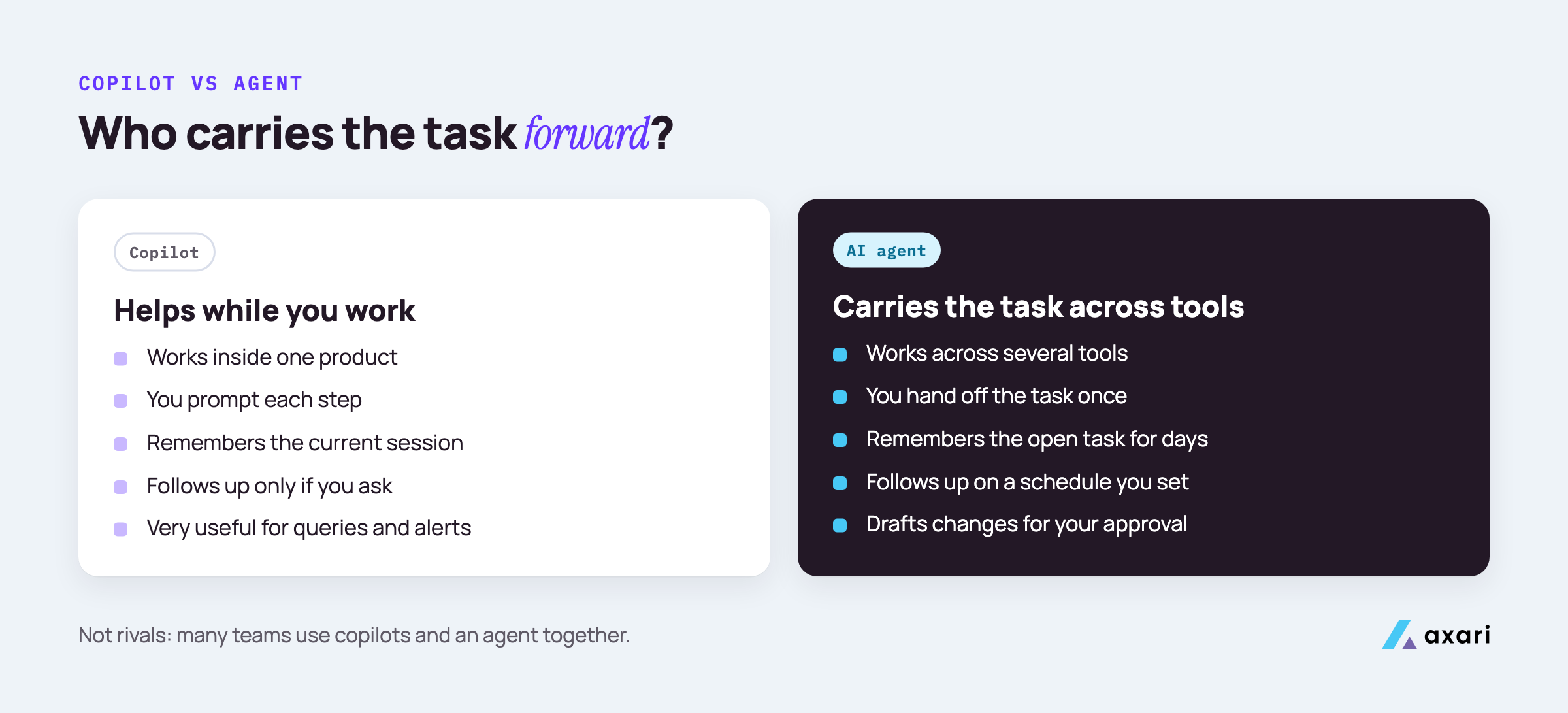
A side-by-side view:
| Copilot | AI agent | |
|---|---|---|
| Where it works | Inside one product, such as your SIEM or code editor | Across several tools |
| Who starts each step | You, with a prompt | You hand off the task once |
| Memory | The current session | The open task, across days |
| Follow-up | None unless you ask again | Comes back on a schedule you set |
| Changes to systems | Usually suggestions | Drafts changes for your approval |
A SIEM (security information and event management) tool collects logs and alerts in one place. A copilot inside it helps you write a query or explain an alert while you are looking at it. It won't remember, next Thursday, that the alert led to a ticket nobody has touched.
Many teams will use copilots inside their tools and an agent for the work that falls between them.
How do AI agents compare with SOAR?
SOAR runs playbooks you design in advance, which suits repeatable, well-defined steps such as enriching an alert or isolating a host. AI agents handle work that does not fit a fixed playbook, like working out who owns an asset or writing a context-aware follow-up. Many teams use both: SOAR for predictable steps, the agent for the coordination around them.
SOAR stands for security orchestration, automation and response. A playbook is a fixed sequence: when this alert arrives, look up the IP address, check it against threat intelligence, and open a ticket if it matches. SOAR does this the same way every time, quickly and with a clear record, which is what you want for steps with one right answer.
Coordination work rarely runs the same way twice. "Who owns this server?" might mean checking AWS tags, then a GitHub CODEOWNERS file, then asking in a team channel. "Has this been fixed?" might mean reading a reply that says "mostly". These steps change from case to case, which makes them hard to write as a playbook.
A combined flow might look like this:
- SOAR enriches a new critical finding with asset data and opens a ticket, as designed.
- The agent finds the service owner and the owning manager.
- The agent drafts a message explaining the risk and the fix, for your approval.
- The agent follows up until the ticket is closed, then re-runs the scanner check to confirm the finding is gone.
What security tasks can AI agents do today?
Today AI agents are good at the coordination work around security tools: summarizing findings, finding the right owner, opening and updating tickets, chasing follow-ups, gathering audit evidence, drafting questionnaire answers and re-checking whether a fix closed the finding. They are less reliable at judgment calls such as accepting a risk, which should stay with people.
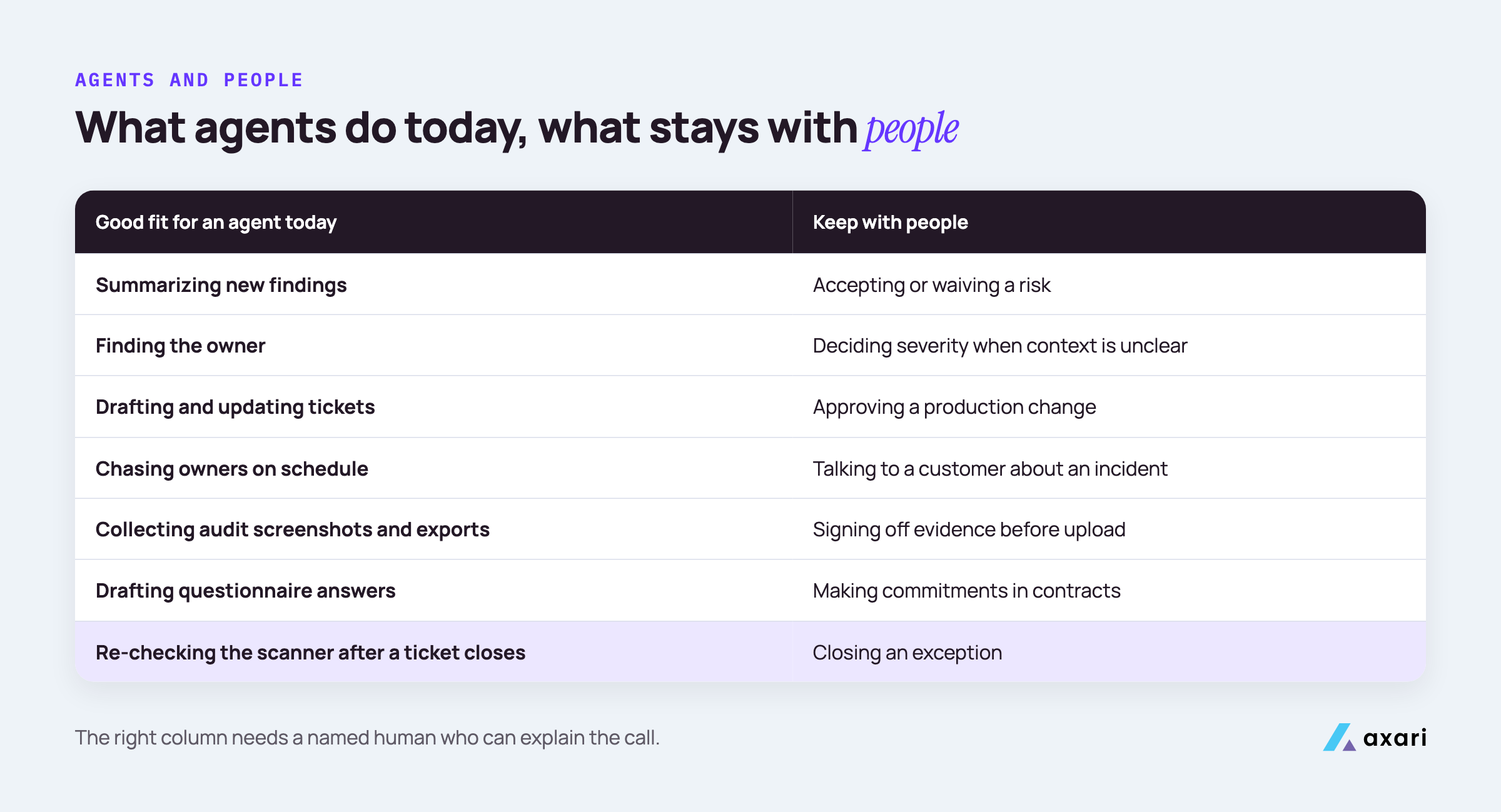
A practical split for a small team:
| Good fit for an agent today | Keep with people |
|---|---|
| Summarizing new findings from Snyk, Qualys or Wiz | Accepting or waiving a risk |
| Finding the owner from tags, repos or your identity provider | Deciding severity when the context is unclear |
| Drafting and updating Jira or ServiceNow tickets | Approving a production change |
| Chasing owners for status, politely and on schedule | Talking to a customer about an incident |
| Collecting screenshots and exports for an audit | Signing off on evidence before upload |
| Drafting questionnaire answers from approved material | Making commitments in contracts |
| Re-checking the scanner after a ticket closes | Closing an exception |
Watch the last row on the left. A ticket can be closed without the underlying issue being fixed. An agent that re-runs the scanner check before marking the work done catches that gap, which otherwise only shows up in the next audit or the next scan.
Everything in the right column needs a named person who can explain the call later, whatever the tooling can do.
What can AI agents do for GRC and vendor risk teams?
For GRC teams, an AI agent collects evidence from systems and owners, tracks which controls are missing proof, and prepares items for your approval and upload to Vanta or Drata. For vendor risk, it can gather vendor documents, compare them with your requirements and flag gaps for review. Decisions about risk and vendors stay with your team.
GRC stands for governance, risk and compliance: policies, audits and frameworks such as SOC 2. Platforms like Vanta and Drata are the system of record here. They run automated tests against your cloud, identity and code tools and show which controls are passing. Vanta's agent can now create the Jira ticket, assign it to the right owner and link it back to the failing item.
An agent's work starts after the ticket exists: reminding the owner, collecting the screenshot of the new Okta setting or the GitHub branch protection rule, and preparing that evidence for you to review and upload.
For vendor risk, a typical task is reading a vendor's SOC 2 report. A Type 1 report checks that controls are suitably designed at a single point in time. A Type 2 report checks that they operated effectively over a period, often several months. An agent can pull the report from the vendor's trust center, note which type it is, check the dates and scope against your requirements, and list the gaps. You decide whether those gaps are acceptable.
What does an AI teammate do for a CISO or security lead?
For a CISO or security lead, an AI teammate keeps track of what is open, who owns it and what is overdue, so status updates need no chasing. It can draft the weekly summary, flag items blocking an audit or a deal, and prepare decisions with context attached. The lead still makes the calls and approves what goes out.
A CISO (chief information security officer) at a small company can spend hours each week asking for status. Which critical findings are still open? Did the access review finish? Is the questionnaire for the big deal done?
What this looks like in practice:
- Monday: a short brief on the few items that need you this week, with owners and due dates pulled from Jira and your scanners.
- During the week: a short note when something is about to block an audit date or a sales deadline, with the ticket and owner attached.
- Before a decision: a one-page brief on a risk acceptance request, with the finding, the asset, the owner's reasoning and the history.
- Before a board or leadership update: a first draft built from the records, not from memory.
The lead still makes every call; the agent does the chasing beforehand.
Why run AI agents in Slack or Microsoft Teams?
Running AI agents in Slack or Microsoft Teams puts security work where engineers already answer messages, so follow-ups get seen and answered instead of going unread. Axari gives each person on the security team an AI Twin there that follows up with owners and asks for approval before anything is sent or changed.
Most engineers will not log into a security tool to check what they owe. They will answer a direct message from a colleague.
A few habits make chat follow-ups work:
- One clear ask per message. "Can you confirm the fix for this finding is deployed?" with a link, not a wall of findings.
- Context attached. The ticket, the asset and why it matters, so the owner does not have to go looking.
- Replies land on the record. If an engineer answers in a thread, that answer should end up on the Jira ticket, not stay in chat.
- Approvals in the same place. You approve a drafted ticket or message with a click where you already are.
- Respect for attention. Batch reminders and keep them polite. An agent that nags gets muted.
Both Slack and Microsoft Teams support apps that post messages, read thread replies and show approval buttons, so no new interface is needed.
Why pay for an AI agent when you already have Claude or ChatGPT?
Claude and ChatGPT reason well over what you give them in a chat, but security work needs more around the model: connections to scanners and ticketing, memory of open work across weeks, scheduled follow-ups, approvals and an audit trail. You can build that yourself or buy it. Some products, Axari included, let you bring your own model key.
Claude and ChatGPT handle the reasoning well. Paste in a finding and they will explain it, suggest a fix and draft a message to the owner. The gap is everything that has to happen after the chat closes:
- Connections to Wiz, Snyk, Jira, GitHub, Okta and AWS, scoped to read first.
- State: which findings are open, who was asked and what they said.
- A schedule so follow-ups happen without anyone remembering.
- Approvals that stop any write or message until a person says yes.
- An audit trail of what was read, drafted, approved and sent.
- Data handling your security review will accept.
Without that layer, you are still the one prompting, copying, following up and checking. A fair test is to run a chat and an agent on the same real finding and see which one is still following up a week later.
"Bring your own model key" means the product calls the model, such as Claude or OpenAI's GPT models, through your own account with the provider, so your existing agreement covers what the model sees. Task state and the audit trail still live with the vendor.
Building this yourself makes sense only if engineers can maintain it for years.
How do you roll out an AI agent on a small security team?
Roll out an AI agent on a small security team by starting with one workflow, such as chasing vulnerability owners, and read-only access. Require approval for every write or message, review the audit trail weekly, and widen permissions only after its drafts are consistently right. Tell engineers what it will message them about before it starts.
A rollout plan you can run in a few weeks:
- Pick one workflow. Chasing owners for critical findings is a good first choice because the result is easy to measure: did the ticket move?
- Connect read-only. Give it access to the scanner and the ticketing system and nothing else.
- Approve everything. Every ticket, comment and message waits for a person at first.
- Announce it. Post in the engineering channel what it will ask about, who it acts for, and how to reply.
- Review weekly. Read the audit trail. Note every draft you had to fix and why.
- Widen slowly. Add a second workflow, such as audit evidence, only when the first one runs cleanly.
Questions to ask any vendor before step 2:
- Can it delete anything, in any connected tool?
- What exactly does the audit trail record?
- Which actions can run without approval, and who decides that?
- What security reports can you share, and of which type?
- Where does our data go, and can we use our own model key?
For the full list with good answers and red flags, see 10 questions to ask AI security vendors before buying.
Frequently asked questions
Should you build or buy an AI agent for your security team?
Build if you have engineers who can own integrations, permissions, approval flows and an audit trail for the long run, because the model is the smallest part of the system. Buy if your team is small and you need the work done this quarter. Either way, ask the same questions about access, approvals and data handling.
What is the difference between an AI agent and a chatbot for security work?
A chatbot answers a question and drops the task when the conversation ends. An AI agent for security work keeps the task open, uses connections to your tools to act on it, follows up later and records what it did. A chatbot is enough for answers. Follow-through takes an agent.
How do AI agents differ from workflow builders like Tines and Torq?
Workflow builders like Tines and Torq run automations you can describe step by step, reliably and at scale, and both now offer AI agent features. A workflow runs a defined process. Coordination work changes shape across people and weeks, so an agent decides who to ask and adjusts to the replies. Many teams use both.
See Tines' AI Agent action and Torq's agentic AI.
Where to start this week
Write down the one piece of security work that keeps stalling between tools. For most small teams it is chasing owners after a scan. Start there.
Security tools find the work. Axari makes sure it gets done. Each person on your team gets an AI Twin in Slack or Microsoft Teams that takes responsibility for an outcome, such as keeping critical vulnerabilities within policy. It carries each finding to its owner and keeps the follow-up moving until the fix is verified. You keep the judgment, and nothing is sent or changed without your approval. To see how it would work for your team, request a demo.